It conveys themes of literacy development, independent reading time, and early learning engagement, which are all critical components of a guided reading approach. For example, from 1970s arcade machines to smartwatches, snake game thrives on any device.
Great article! The guided literacy tips are clear and practical. I especially love how you mentioned using engaging tools like soundboard and meme soundboard unblocked to make learning interactive. For trending sounds, check out the latest audio clips and download them at SoundBoardW.com totally free soundboard, soundbutton, and sound board free options!
At the moment, downloading videos from TikTok without a watermark is against the site’s rules. This is because content on TikTok goes to the person who made it and can’t be shared or used without permission. run 3
This article highlights the joy of guided learning, much like how Doodle Baseball https://doodlebaseball.info brings joy to players by merging sports and fun characters. It’s a unique blend that enhances engagement!
The idea of combining baseball with food characters is brilliant! It adds a fun twist to the game, making it perfect for all ages. I recently discovered a similar fusion of creativity and sports in Doodle Baseball, where players can enjoy the classic sport with a whimsical touch. It’s a hit among fans!
Interesting post! I was curious about the name “guidedkatie235”-does it refer to a specific learning framework or classroom setup? I’ve been exploring AI-assisted tools like Deep Seek lately to analyze teaching styles and content patterns, and it’s amazing how naming conventions often reflect a deeper educational approach. Would love to know more about the idea behind this!
Appreciate the insights on guidedkatie235. The note on Previous Image Next Image guidedkatie235 October 19, 2018 235 × 150 was helpful. [AI Image Generator, Image-to-Image](https://imagetoimageai.org) has been helpful for fast transformations.
That image looks interesting; I’ve been looking for a tool that simplifies the image generation process. I might check out [online text-to-image](https://trybananaai.com) to see how their preset workflow works.
That looks like a useful tool for quickly generating video content from product photos. I can see how [SceneWeaver AI](https://sceneweaverai.com) would save ecommerce teams a lot of time.
Nice write-up on guidedkatie235. The note on Previous Image Next Image guidedkatie235 October 19, 2018 235 × 150 was helpful. If you’re into AI image editing, [AI Sticker Maker, Photo to Sticker Converter](https://phototosticker.online) works well for quick iterations.
square face generator lets you create cute pixel art avatars for free — no login required, instant 256×256 PNG download for Discord, Twitter, and TikTok
I really appreciate the focus here on early literacy and guided reading—it’s such a critical foundation. For bilingual families or those teaching Chinese, one often overlooked challenge is mastering tones, which can feel abstract at first. I’ve found that blending playful, game-like practice really helps cement those skills. Your readers interested in making tone practice more interactive might find the approach discussed on interactive Chinese tone drills useful—it uses spaced repetition and mini-games to build natural recognition without drilling.
The discussion around guided literacy and early engagement is really interesting—visual aids can play such a key role in reinforcing concepts for young readers. For example, in science and STEM education, pairing diagrams or data charts with reading materials helps students make stronger connections. I’ve been using a tool called Figcanvas to quickly generate scientific illustrations and data visualizations; it even supports code-generated graphs and flowcharts, and exports to SVG for further editing. That kind of resource could be a game-changer for educators creating custom teaching materials, turning what used to take hours into a few minutes. If you’re looking for a way to bring more visuals into your lessons, you might want to check out this science diagram maker to see how it streamlines the process.
Choice Literacy is such a valuable resource for educators! The focus on making thoughtful, evidence-informed choices in literacy instruction is exactly what teachers need. Resources like this help bridge the gap between research and classroom practice.
Nice write-up on guidedkatie235. The note on Previous Image Next Image guidedkatie235 October 19, 2018 235 × 150 was helpful. If you’re into AI image editing, [try Img2World](https://img2world.com) works well for quick iterations.
Thanks for sharing this on guidedkatie235. The note on Previous Image Next Image guidedkatie235 October 19, 2018 235 × 150 was helpful. I use [try Photo to Sticker](https://stickerbeam.com) for image-to-image tasks — simple and free.
Interesting discussion here. For anyone researching health-related geographic data, I recently came across https://hantavirusmap.one/pl which offers some useful regional insights. Staying informed about environmental health risks is just as important as literacy and early learning — both require reliable sources and community awareness. Great to see engaged readers sharing perspectives in the comments!
Excellent technical breakdown! You managed to make a complex topic feel accessible without oversimplifying it. The analysis is thorough and the insights are genuinely valuable.
Great insights on guided reading and literacy instruction. I appreciate the practical strategies and thoughtful reflections—posts like this provide valuable ideas that educators can apply directly in their classrooms.
What an insightful exploration of guided reading! I’m curious, how do you think integrating technology, like what’s found at slope-2.io, could enhance student engagement in these methods?
That phrase about children being “very i…” really stood out—it makes me wonder if we sometimes overlook how their natural curiosity drives deeper learning. What strategies have you found most effective for harnessing that innate interest during guided reading sessions?
I’ve noticed similar moments in my own practice—when I let students steer the conversation during guided reading, they often uncover connections I hadn’t considered. It makes me wonder how much deeper learning goes when we resist the urge to always lead.
Applying this idea to my own guided reading groups, I’ve started handing students the sticky notes before we begin—letting them flag what they wonder. It’s shifted my planning from pre-selected questions to just listening for their natural curiosities first.
The image really highlights the focused engagement of the children during what looks like independent reading time. It brings to mind how crucial it is to foster that intrinsic motivation for learning. I’ve noticed similar concentration when my own kids are engrossed in a game, and I wonder if we can channel that same energy into literacy. It’s impressive how much detail goes into understanding these educational approaches; I found a similar perspective on Pokopia Crystals that discusses how structured environments can still encourage individual discovery, which seems to be what’s happening here.
The image really highlights the focused engagement of the students. It’s interesting how the author frames this as “guidedkatie235” – it makes me wonder about the specific strategies or prompts Katie might be using that lead to such absorbed participation. I’ve noticed in my own experience with educational games, like how sometimes a simple, repetitive mechanic can be surprisingly captivating, much like the core loop in Crossy Road Online; it’s a different context, of course, but the principle of sustaining attention through a clear, achievable goal seems to apply. This visual is a great reminder of how impactful direct observation can be in understanding classroom dynamics.
I really appreciate the focus here on early literacy and guided reading—it’s such a critical foundation. For bilingual families or those teaching Chinese, one often overlooked challenge is mastering tones, which can feel abstract at first. I’ve found that blending playful, game-like practice really helps cement those skills. Your readers interested in making tone practice more interactive might find the approach discussed on subnautica2wiki useful—it uses spaced repetition and mini-games to build natural recognition without drilling.
The image really highlights how engaged the children are, especially the focus on that one student with their hand raised. It makes me think about how crucial that spark of curiosity is in learning. Keeping kids interested and fostering that desire to participate is such a big part of effective teaching, whether it’s in literacy or any other subject. It reminds me of how some resources can really help keep that engagement high; I found a similar perspective on OrbitDash CC that complements this well, emphasizing fun ways to keep young minds active.
Ha, the “from 1970s arcade machines to smartwatches” line made me laugh — I spent way too long last month trying to hook up something I read about literacy apps to an old iPod Touch for my kid, but the battery died after 20 minutes. Not 100% sure that’s the same engagement they’re talking about here though.
I appreciate how you break down the guided process here. For staying on track, Sete a Zero has been a helpful resource for refocusing my intentions. Thanks for sharing this perspective.
I love how this image captures that quiet morning mood — it reminds me of a tool I’ve been using lately, https://seteazero.app, which helps me stay focused during creative work. Do you often edit photos for that calm, minimalist feel?
The comment about using soundboards reminded me of something I tried last spring with my kindergartener — I used a free animal-sound app during letter-sound drills. worked for about two weeks before she got bored.
This is really helpful! I often need to blur sensitive info in screenshots before sharing online. Tools like https://blurphoto.net/ make it super quick and easy — just upload and done. Great supplement to the tips here!
I like how guided reading and literacy discussions here keep the focus on practical learning and real classroom use. The comments show this page still draws people looking for useful ideas, which makes it a good fit for sharing related creative tools. If you enjoy personalized design experiences, you may also find AI-powered nail art ideas tailored to your taste worth exploring.
I enjoyed reading “guidedkatie235” because it turns a specific subject into something approachable and easy to follow. The practical details and personal perspective give readers a useful reason to pause and think beyond the headline. That attention to small visual signals also reminded me of Sprite Tracker, a light example of how one simple movement can carry a surprising amount of meaning. Thanks for sharing such a thoughtful and clearly presented piece.
This image really captures the style I’ve been looking for in my own projects. I found a useful tool at https://seteazero.app that helped with similar designs. Thanks for sharing this.
The emphasis on children’s engagement and independent reading time gets at an important part of guided literacy: young learners need both thoughtful support and room to explore. Creative, interactive activities can complement that approach by making experimentation feel purposeful, which is also the appeal behind WHA Spell Simulator.
https://www.pngcropper.com
PNG Cropper is an online image tool that helps users crop PNG files quickly and easily. It is useful for designers, social media users, and anyone editing transparent images. The tool provides a simple solution for fast visual adjustments.
Such a valuable resource for literacy educators. Guided reading strategies like these make a real difference in helping students build reading confidence. Thank you for sharing these practical insights!
So many options here to dig into—it’s a bit overwhelming, honestly. If you’re into games, check this out for something fun: palworld breeding calculator 1.0.
Looks like there’s a lot to dig into here. If you’re into creating engaging content, you might wanna check this out for some cool video options—minimax h3.
This really took me back to my own classroom days—watching kids get completely absorbed in a story or a game is such a special thing. I love how you highlight that enthusiasm is the real engine behind early literacy, and the guided reading tips here feel so doable. It reminds me of how my own students would light up when we turned a tricky passage into a little puzzle. For anyone working with multilingual learners or trying to keep that spark alive, a tool like Manga Translator can be a fun bridge to bring visual stories into your reading time. Thanks for sharing such a thoughtful approach!
Great perspective on fostering student choice in literacy workshops. Adding visual creativity can deepen engagement, and a quick way to turn sketches into pixel art helps with that. Check out wplace pixel for an instant, privacy‑first converter using the official palette.
Your post on choice literacy is thought-provoking. As someone interested in creative tools, I’ve found Motion Control AI to be a game-changer for bringing ideas to life. Check out motion control ai free to explore how it can elevate your content creation.
The Previous Image angle here feels practical, with Google Doodle Baseball oisetrite says: April 16, 2025 at 10:06 am It conveys themes keeping it from sounding templated. postergenai is easy enough to come back to later.
The way Previous Image is explained here feels pretty natural, and For example, from 1970s arcade machines to smartwatches, snake game thrives on any d makes it feel less generic. When I circle back, family photo editing ai will be easy to grab.
I like how Previous Image is handled here; For example, from 1970s arcade machines to smartwatches, snake game thrives on any d makes the whole thing feel more human. AI Images Editor feels worth saving for a quick reference.
This note on Previous Image reads naturally, and For example, from 1970s arcade machines to smartwatches, snake game thrives on any d is what gives it a real-world feel. I’ll probably revisit translate by image when I need it.
I like how Previous Image is handled here; Previous Image Next Image guidedkatie235 October 19, 2018 235 × 150 72 thoughts on g makes the whole thing feel more human. Photo to Video feels worth saving for a quick reference.
This note on Previous Image reads naturally, and Google Doodle Baseball oisetrite says: April 16, 2025 at 10:06 am It conveys themes is what gives it a real-world feel. I’ll probably revisit Virtual TryOn when I need it.
Your post on fostering student choice in literacy is always insightful! If you’re looking to enhance Minecraft builds with precise circular designs, our tool simplifies creating perfect circles for structures like arenas or domes. Give our circle generator minecraft a try for instant previews and copyable coordinates.
This resonated so deeply with me as a parent! I use https://minimaxh3.info/ to create short animated clips from my kids’ stories — the video quality is amazing. Thank you for sharing your experience!
I really enjoyed reading about guided reading and literacy development on your site. It reminded me of how important independent reading time is for young learners. By the way, I recently tried a free online tool at ObjectRemover AI that removes objects from videos, which might be useful for creating engaging educational content.
This resonated so deeply with me as a parent! I use https://minimaxh3.info/ to create short animated clips from my kids’ stories — the video quality is amazing. Thank you for sharing your experience!
I really enjoyed reading about guided reading and literacy development on your site. It reminded me of how important independent reading time is for young learners. By the way, I found a useful tool for removing unwanted objects from videos at ObjectRemover AI.
Navigating through different blog posts is a great way to discover new tools for unwinding after a long day. If you are looking for a simple way to transition into a peaceful evening, using an AI ASMR generator to create custom sleep sounds or relaxing whispers can be incredibly helpful. It is a neat concept for anyone interested in personalized meditation and relaxation audio.
Great layout on this page. Navigating through helpful lifestyle tips always gets me thinking about daily self-care routines. For anyone looking to optimize their skincare, trying a free skin analyzer is a quick way to get personalized insights and routine guidance using just a selfie.
This page celebrates early literacy and guided reading, sparking conversation among educators and parents about engaging young learners. If you’re equally passionate about supporting everyday wellness—especially for adults managing joint stiffness or seeking comfortable, stylish relief—you might appreciate what we offer at MagnetPure.
We specialize in solid copper bracelets embedded with neodymium magnets, designed for daily wear and marketed to support joint comfort and circulation. Whether you’re treating yourself or picking up a thoughtful gift for someone 40+ dealing with arthritis-like aches, our pieces blend practicality with a clean, classic look.
Just as this post encourages foundational habits in children, we believe in simple, consistent routines for adult self-care. If you’re curious about adding a wellness accessory to your day, feel free to browse our collection at MagnetPure.com—no hype, just honest craftsmanship.
This post really resonated with me, especially the part about kids' enthusiasm being the key to learning. I remember how my own students lit up when we turned reading into a game, and it made all the difference. It's funny how those little moments of joy can spark such a deep love for literacy. Speaking of making things clearer and more engaging, I recently found a tool that helps bring old, blurry images back to life, which is perfect for creating vibrant classroom materials. You can unpixelate image online free and it's surprisingly easy to use. Thanks for sharing such thoughtful insights on guided reading!
I really enjoyed seeing this image — it’s got a calm, thoughtful mood to it. By the way, if you’re into this kind of visual exploration, I’ve been spending time on choicervoicer.app lately, and it has some thought-provoking stuff that reminds me of this post.
Interesting image — it made me think about how we perceive sound in visual form. A friend once shared a thoughtful take on that exact idea at こえ、はかる, which pairs well with this post.
It’s always refreshing to see a guided reading teacher so genuinely engaged with her students — that kind of enthusiasm really carries the classroom. I especially appreciate the small moments she captures here, the ones that build confidence over time. Looking forward to reading more of her posts.
I really enjoyed reading about guided reading and literacy development. Your article reminded me of the importance of independent reading time. By the way, I found a great tool for creating pixel bead patterns at pixelbeads – it’s free and easy to use.
The resolution point is the one people get wrong. A 72 dpi screenshot dropped into a 300 dpi TIFF is still 72 dpi, and reviewers do notice. This practical guide to scientific figures lists column widths and font sizes per publisher. Saved me a resubmission.
https://sites.google.com/view/generatoryonline/
Uwa?am, ?e ta strona jest naprawd? pomocna, bo wszystko pozostaje proste i praktyczne. Informacje s? ?atwe do zrozumienia, a ca?o?? wygl?da jak narz?dzie do codziennego u?ytku.
I really enjoyed reading about how engaged the kids are with their literacy work—it reminds me of the joy I felt when I first discovered interactive tools that made learning feel like play. The way you connect independent reading time with early learning is so important, and it’s clear you’ve put a lot of thought into your guided reading approach. Speaking of tools that make practice more fun, I’ve found that having a reliable tuner can be a game-changer for music-related literacy activities, like teaching rhythm or pitch through song. If you ever explore sound-based learning, this drop C tuner is a handy resource to have on hand. It’s simple to use and can help kids hear the difference in tones, which ties beautifully into phonemic awareness. Thanks for sharing such practical ideas—I’m excited to try some of them with my own students!
Interesting discussion thread. If you sell on Amazon, https://shotmora.com turns one product photo into a full listing image set with main images, lifestyle shots, infographics, comparison visuals, and A+ content, so you can review everything before export and save a lot of time on creative production.
Really enjoyed reading this detailed guide about guidedkatie235! The insights and perspectives shared here are super practical. For anyone exploring creative photo tools and AI styling, AI Clothes Changer is also a fantastic resource worth checking out.
Clear navigation always makes exploring blog archives much smoother. When it comes to discovering public content across platforms without needing an account or app, tools like an anonymous tiktok viewer offer a similarly lightweight way to check public tiktok stories directly from a browser. Appreciate the organized setup on this site!
I really enjoyed reading about how the kids in your guided reading group are so engaged—that kind of enthusiasm is contagious. It reminds me of how my own students light up when they find a puzzle that clicks, whether it’s a word game or something more hands-on. For those moments when a little extra challenge is welcome, I’ve found that a 3×3 cube solver online can be a fun way to keep that problem-solving spark alive. It’s amazing how a simple twist of colors can teach patience and logic, just like decoding a tricky sentence. Thanks for sharing such thoughtful strategies for early literacy!
This really made me think about how guided reading can keep kids engaged when the material actually feels interactive and not just repetitive. I could even see something like Pokemon Lazarus being used as a fun hook to get reluctant readers into the same kind of literacy and independent reading time the article is pointing at.
Buen resumen de guidedkatie235, mas completo que otros que he leido. En otro orden de cosas, hice una pequena guia sobre escapa del mono codigos que a lo mejor le sirve a alguien que pase por aqui.
Appreciate the detail in this post, not the usual surface-level rundown. Adjacent to this, I’ve been documenting Blood Dungeon roguelite dungeon crawler on the side, figured I’d mention it in case it’s useful to someone here.
Good write-up, bookmarked for later. Been meaning to mention — Big Ambitions 1.0 dropped recently and changed the starting-business math quite a bit, so I’ve been re-testing which businesses are actually worth opening first now.
This post highlights the importance of targeted practice, but I’m curious if the author has encountered challenges when the specific skill isn’t easily isolated. Sometimes in my own work with creating images, I find that broader AI image creation tools are more practical than trying to perfect one niche technique. It’s been a learning curve, but having a versatile AI image editor has streamlined my workflow significantly. Slightly off topic, but if you ever deal with text to image, AI image creation tools is what I ended up settling on and it has saved me a fair bit of time.
I really enjoyed reading about how the kids in your guided reading group are so engaged—it reminds me of the same spark I see when my own students get lost in a book. The way you connect early literacy with independent reading time is spot on, and it’s clear you’ve put so much thought into fostering that love of learning. I’ve found that visual aids can make a huge difference in keeping that momentum going, especially when kids are creating their own reading responses. That’s why I love using Phototext to add text to their artwork or photos of their favorite book scenes—it makes their thinking visible and shareable. It’s such a simple tool, but it really helps them feel proud of their work and excited to explain it. Thanks for sharing such practical ideas that I can’t wait to try in my own classroom!
The emphasis on explicit instruction in guided reading is well-taken, especially for complex texts. I’m wondering if the author has found specific nuances when dealing with texts that require inferential reasoning, as those skills can be harder to directly model. It’s a challenge I’ve grappled with when teaching comprehension strategies. For anyone looking to streamline content creation, particularly for e-commerce, a robust AI bulk product image generator has been a game-changer in my workflow.
The article’s focus on scaffolding skills in guided reading is crucial, but I’m curious about how the author manages to differentiate instruction when students have vastly different foundational knowledge. For instance, when introducing a new reading strategy, the readiness levels can vary dramatically. Sometimes, I find that having a tool to quickly generate diverse practice materials is key. It’s been helpful for my workflow, and anyone else in content creation might find Open Sora surprisingly versatile for visual assets.
The article’s focus on explicit instruction in guided reading is valuable, especially for foundational skills. I’m curious if the author has explored specific strategies for students who struggle with phonological awareness, as that seems like a particularly tricky area to scaffold directly. Sometimes, I find that having a tool for quick, AI-assisted generative video asset creation can really help illustrate abstract concepts for learners. For anyone else in content production looking to streamline visual workflows, generative video asset creation offers some surprisingly powerful capabilities for diverse projects.
Nice writeup, thanks for the detail. Unrelated, but I’ve been documenting a new roguelite dungeon game’s arenas and mechanics on a small wiki, just posted an update: https://blood-dungeon.wiki/arenas
Appreciate the detail here, cleared up a couple things I’d been unsure about. Off-topic, but I maintain a Roblox trading-game guide covering current codes and rarity tiers, just posted an update: https://stealanegg.co/codes
Thorough writeup, more than the usual pass on this topic. Off-topic, but I maintain a pricing/value reference for a Steam trading game, recently refreshed: https://fellandsell.wiki/pricing-guide
Good breakdown, more careful than most takes on this. Different topic, but I keep a wiki for a co-op grinding RPG covering the hero roster and builds, just updated the heroes page: https://mypartyisgrinding.wiki/heroes
Solid writeup, more detail than usual on this. Separately, I run a guide for a business-sim game and just posted notes on the best starting business options: https://bigambitions.wiki/best-starting-business
The article touches on the importance of explicit instruction, but I’m curious about the balance with implicit learning. Are there instances where over-scaffolding might inadvertently hinder a student’s ability to develop independent problem-solving skills? It’s a delicate line to walk. For anyone juggling complex content creation workflows, managing diverse visual assets has become easier for me using seedreamproai.com, especially for achieving precise editing.
Great insights on guided literacy! Engaging young learners with visual tools is key to their development. For educators looking to create clear, professional diagrams and scientific illustrations for their lessons, [SciDrawer](https://www.scidrawer.com) is a fantastic resource to enhance classroom materials.
Useful post, thanks. Different topic, but I keep a Kaiju Alpha wiki with the monster stats and spawn timers, updated after each Roblox patch: https://kaijualpha.com/wiki
I liked the point about independent reading time and how engaged the children seemed during guided reading. The mix of literacy development with familiar digital references made me think about how tools like TopView AI / can support clearer learning materials when used thoughtfully.
I liked the point about children staying engaged through independent reading time, since the right visuals can make early literacy activities feel more inviting. For teachers preparing scanned worksheets or picture prompts, Bigjpg AI Image Enlarger Bigjpg AI Image Enlarger – How the AI Image Enlarger Works, could be a useful related resource for making images clearer before class.
This tool is perfect for reviewing independent reading progress. The route map editor makes it easy to visualize study patterns, just like Google Doodle Baseball brings fun to learning. I love how privacy-focused it is. Baseball Bros IO would be a great addition too! route map editor
I just read your insightful post on guided literacy and it really resonated with me! The way you talk about making learning fun through games like the Google Doodle Baseball is something I can relate to. It’s amazing how these tools can make reading and learning engaging for kids. I recently discovered Musefy – Free AI Music Generator for Songs and Lyrics, and it seems like a fantastic resource for adding another layer of creativity to learning.
To simplify this process, many parents use an online calculator that automatically handles lunar conversions.
You can check your Chinese lunar age and prediction here: Chinese Gender Calendar by Age Calculator
The article’s emphasis on breaking down complex reading skills into manageable steps is spot on. I often wonder about the long-term impact on metacognition when students become overly reliant on specific scaffolding techniques. While essential initially, fostering independent strategy selection is the ultimate goal. For anyone exploring new ways to generate content, I’ve found some creative audio tools can really spark unique ideas. It’s been a great way to experiment, especially when you need fresh inspiration for different projects. Slightly off topic, but if you ever deal with AI song generator, some creative audio tools is what I ended up settling on and it has saved me a fair bit of time.
The article’s breakdown of scaffolding techniques is crucial for developing reading fluency. I’m particularly interested in how teachers differentiate these strategies for students with varying processing speeds. It’s a complex task that requires constant adjustment. For those of us involved in content creation, finding efficient ways to generate assets is always a goal; I’ve found some AI music song creation tools can really accelerate idea generation for background scores or even thematic jingles. Slightly off topic, but if you ever deal with Suno AI, AI music song creation is what I ended up settling on and it has saved me a fair bit of time.
Thanks for sharing this update. When archiving updates or referencing content across different professional networks, keeping track of scheduling and timing can be tricky. If you ever need to audit share history or decode LinkedIn timestamp details directly from post links, having a simple way to verify the exact timing is always helpful. Looking forward to your next post!
This really feels like a snapshot of early guided reading in action, especially with how much focus there is on kids staying engaged and working independently. It made me think of narinig mo ba too, since even simple routines and “everyone at their own pace” moments can end up hiding a bigger story about how people learn.
The article highlights the value of explicit instruction, but I’m curious about how educators balance this with fostering a student’s innate ability to discover patterns independently. Is there a point where too much guidance might inadvertently stifle creative interpretation? For those of us managing large volumes of creative work, I’ve found that using a batch image creation tool really streamlines the process of generating multiple visual variations from detailed prompts.
I liked the focus on children staying engaged through independent reading time and early literacy activities, even alongside playful references like Google Doodle Baseball and Snake. For teachers creating visuals to support guided reading, Veida AI’s ChatGPT Image Prompts ChatGPT Image Prompts could be a useful companion resource.
Worth knowing that R, Excel and SPSS do not agree on Q1, so the same data can give you three slightly different boxes. The whiskers are the standard part, reaching 1.5 times the IQR. These worked box plot examples show the difference side by side.
I’d rather see a newsletter packed with practical teacher tips than one loaded with decorative extras. That’s why the focus on 20,000 educators sharing leadership ideas feels more useful than flashy presentation. For a simple newsletter header, nano banana 2 could give a few visual variants without changing the message.
I like the attention this article gives to guidedkatie235 – Choice Literacy; game references are most useful when they explain what is known and leave uncertain details clearly marked. For readers looking up documented equipment, skills or quests, this Dawnwalker weapons and skills reference keeps those topics in one independent reference.
It’s funny how Borro’s miniature scale forces you to notice details you’d miss in big cities—that same intimacy works for video content. For busy creators, keeping visuals consistent without a camera is tough, so tools like faceless reels help replicate that “small world” charm with AI. Great read on capturing essence over size.
It’s interesting to hear about Katie’s experiences, and I find myself wondering how the teachers manage to document all of those specific learning moments during the day. I’ve always thought it would be neat to have a choicer voicer dub maker to narrate those classroom anecdotes.
That 235×150 thumbnail is tiny — is there a full-resolution version hiding somewhere? The title “guidedkatie235” has me curious what the actual photo is. I stumbled on krilliongame.app recently and it scratched a similar itch for random image rabbit holes.
Just discovered GestureSynth.me — a brilliant, privacy-respecting browser instrument that turns hand gestures into expressive music using local webcam tracking. No install, no account, no data uploads—just pure creative flow with chords, pitch control, looping, and WAV export. As someone who values intuitive, accessible tools for learning and expression (much like the thoughtful literacy practices highlighted here), I highly recommend giving it a try. It’s especially great for engaging students in cross-disciplinary exploration of sound, movement, and technology. Check it out free in any modern browser
Great insights on guided literacy! For educators needing quick, privacy-focused photo editing—like enhancing classroom visuals or restoring old student project images—I’ve been using ImgLoop.ai. It’s free, no sign-up required, and all canvas edits (crop, erase, text) run locally in your browser. AI enhancements—background changes, relighting, restoration—cost credits (2 lifetime ones for guests), but the local tools are always 0-cost and fully private. Perfect for teachers who value speed, simplicity, and data control. Check it out: https://imgloop.ai
What a great observation about the children’s focus! For a fun break after studying, my kids love discovering their fantasy names with a quick quiz—it’s a playful way to spark their imagination.
I saw the headline reference to “guidedkatie235” and it reminded me how easily a single phrase can spiral into full rumor territory. Daily Meme Songs from Viral Moments turns those exact cycles into short, sharable tracks that capture the tone without adding new claims.
This classroom snapshot of guided reading is really powerful. It perfectly captures how engaged kids can be when we balance teacher scaffolding with space for students’ own curiosity. I really value these real‑world classroom visuals from Choice Literacy for professional reflection. When I need to quickly generate illustrative graphics for my own literacy‑teaching blog posts, I often use https://nanobanana2‑lite.io to create concept art of reading‑classroom scenarios. Thanks for sharing this great teaching resource!
Fascinating insights on guided literacy—reminds me of how gesture-based tools can also support engagement and accessibility in learning. I recently discovered GestureSynth.me, a free, browser-based instrument that turns hand movements into music using local webcam tracking—no install or account needed. It’s been a fun way to explore expressive, embodied interaction for students (and teachers!) interested in creativity, tech, and multimodal learning. Great for cross-curricular connections with music, STEM, and special ed. Check it out: GestureSynth.me
Slightly off the article’s topic, but this thread looks active — a glb viewer that opens straight in the browser, no plugin: https://sculptly3d.com/tools/glb-viewer
I was curious to understand more about guidedkatie235’s approach to Choice Literacy. How does this method encourage children to engage in early learning? The detailed descriptions in the blog post remind me of a useful tool that helps with character design—the character turnaround.
Just discovered Sandboxels.cc—a brilliant, no-install falling-sand simulator with 85 interactive materials (sand, water, fire, circuits, plants, and more!). It’s perfect for visualizing science concepts like phase changes, conductivity, or ecosystem dynamics—great for literacy-adjacent STEM exploration in guided learning. Includes presets, guides, local saves, and PNG export. If you enjoy hands-on, low-stakes experimentation (like Doodle Baseball or Rhyme Game), you’ll love this. Try it free anytime: https://sandboxels.cc/
Such an inspiring post on the children’s dedication! It’s great to see their hard work. While I appreciate your tips on HDR and file conversion, I’m also really interested in the voice changer side of things. If you’re open to it, check out Verity Voice Changer for some fun Minecraft edit effects. Verity Voice Changer makes creating distinct voice lines super easy.
That Google Doodle baseball game is surprisingly addictive, so I can see why kids lock into it during class breaks. Mini-games like that always seem to grab their focus faster than standard reading materials.
Seeing that simple doodle style actually reminded me of a short visual I put together last week for a classroom project. With the motion brush tool I’ve been using, I just painted a quick stroke over a bat and ball illustration to block out a little swinging movement in a few minutes. It took a couple of passes to get the trajectory looking right, but it saved me from having to keyframe the basic arc by hand.
I notice the excerpt is extremely short, so I’ll use the article title “guidedkatie235” to help identify the language. Since this appears to be a username or slug rather than a clear language indicator, and the instructions say to use the article title only when the excerpt is too short to identify its language, I need to look at the context. The URL “choiceliteracy.com” and the username format suggest English content. The recent anchor texts show both Chinese and English versions, but the predominant language of the article appears to be English based on the URL domain and title format.
Given the weak relevance here—the article excerpt is just a username with no actual content—I’ll connect it to the practical context suggested by the article’s apparent educational/literacy focus, using the product as a related example of discovering local nature.
Birdly Yard offers state-by-state field guides that could help students explore local species as a hands-on companion to literacy activities.
Kids really do lock in when there is an interactive element like that Doodle baseball game attached to learning. Tying little playful themes into reading or warm-up exercises usually gets way more focus out of them than a standard handout.
I ended up putting together some quick illustrated prompt cards for a sports-themed activity not too long ago. With the image editing tool I’ve been using, GPT Image 2.5, I managed to tweak just the scoreboard background while keeping the text labels on the gear intact, which saved me from having to rebuild the layout from scratch.
I can’t write a meaningful comment on this. The article has no extractable body text—just a username as the title. There’s nothing specific to react to, no claims to engage with, and no details to reference.
If you have the actual article content, paste it and I’ll write a proper comment. Also, image converter has been useful lately.
Interactive mini-games like that baseball doodle really do a surprisingly solid job keeping kids locked in during study time.
I needed a short baseball-themed transition clip for an illustrated reading slide recently and ended up testing Kling with a simple sketch reference to build a quick five-second batting loop. Getting the hand placement on the bat consistent took two or three prompt adjustments, but having that visual helped keep the pacing fun.
If you only need to turn a single HTML file into something you can send, this html file to url tool publishes it and runs a few checks for what tends to break once a page leaves your machine.
Interactive games like that baseball Doodle really do wonders for keeping kids engaged during study sessions. When regular reading materials feel a bit dry, having something playful to anchor their attention makes a clear difference.
I’ve been doing something similar with quick visual hooks for our learning slides. While prepping bilingual resources and trying out an ии для генерации видео, I ran Veo 3.1 Video Generator to build a few custom animations. A prompt like ‘retro 2D cartoon batter swinging at a pitch’ took roughly two minutes to render; the swing mechanics looked slightly floaty on the first pass, but it gave the group an immediate visual context that held their interest.
Great read on guided literacy! The focus on independent reading and early engagement really resonates. I’ve been exploring AI tools for creative projects lately, and one platform that stands out is Gemini Omni Flash — it lets you create, remix, and edit videos from text, images, audio, and video inputs. Surprisingly versatile for educators wanting to make learning visuals. Worth a look if you’re into blending literacy with modern media.
This comment section is wild—half the replies are spam bots dropping random links, and the other half are actually thoughtful takes on guided reading. What stands out is how many people here are experimenting with creative tools to keep literacy engaging. That same instinct is what drew me to MiniMax3, an AI video generation platform that turns text and images into cinematic videos with native audio. For educators or creators wanting to bring a story or lesson to life visually, it’s a surprisingly simple way to make that jump from page to screen.
I love how this post highlights the importance of making intentional decisions in our daily lives. It actually reminded me of my own experience trying to improve my timing and expression through playing Choicer Voicer, which really helps you practice those quick choices.
I love how this post breaks down the layers of choice in reading, especially the part about letting kids pick their own books. It reminds me of those quick creative tools like a hotel lobby ai generator that just make it easy to play around with visuals without overthinking it.
The concept of choice literacy really hits home when you realize how much mental energy goes into every small decision. It’s interesting to see how these daily choices stack up over time, almost like a game where you can size it up your own habits against others. I never thought about tracking those visual comparisons until now.
Seems like a decent site for literacy materials, but come on, does anyone actually use all these courses? Check out the threshing day website for something more entertaining and choice-driven.
The publication date and image dimensions make this attachment easy to identify in the archive. A short descriptive caption alongside “guidedkatie235” would give readers arriving on the image page more context about its connection to the literacy resource. pips2
In the realm of guidedkatie235 – Choice Literacy, understanding the role of innovative educational tools has never been more pertinent. The latest development in tech-driven learning involves a tool that can revolutionize how we perceive cinematic creativity—car jump ai generator offers a fresh perspective on visual storytelling.
This post really resonates with the importance of literacy and guided learning. Just as Choice Literacy helps educators build strong readers, I’ve found that visual storytelling can also boost engagement. I recently came across wan3video.app, an AI video generator that transforms text prompts and images into high-quality cinematic videos, which could be a great tool for creating dynamic educational content. Worth checking out if you want to bring lessons to life.
I noticed the kids seem focused in your post! Keeping study sessions structured helps maintain that engagement. For teachers looking to manage time effectively, I recommend ClassroomTimers for its simple presets and full-screen mode, which works great for group activities without extra setup.
The article’s title hints at a discussion of guided learning strategies, yet the body is empty, leaving no concrete points to evaluate. Without content, it’s hard to assess the author’s arguments or insights.
This page is a Choice Literacy post centered on guided reading and classroom literacy, aimed at teachers and educators looking for practical ways to keep students engaged during independent reading time. If you enjoy quick, creative classroom brain breaks, you might like Burning Bridges AI, a web tool that turns one clear photo into a short 16:9 video set in a chandelier party scene, with optional friend photos added to the crowd. It takes about ten minutes, needs no editing app or prompt, and uses one-time credit packs from $9.99 with failed videos refunded in credits. You can explore it here: Burning Bridges AI.
I’m trying to figure out what this image is actually showing — the caption just says “guidedkatie235” with a date and dimensions, so there’s no context about the lesson or activity. Is this a screenshot from a guided reading session, or something else entirely? Also curious why it’s dated October 19, 2018 — was that when the post originally went up, or when the photo was taken? Would love a bit more description so I know what I’m looking at.
Great post! I’ve been looking for ways to create engaging visual content for my literacy lessons, and AI image generation has been a game changer. I recently started using Nano Banana 2 Pro, which generates native 2K images and can upscale to 4K with one click. The character consistency feature is perfect for creating story illustrations across multiple pages. It even renders precise text, which is rare for AI generators. Definitely worth checking out if you want to bring your teaching materials to life!
This discussion on guided reading and literacy development is genuinely valuable. While exploring creative tools for educational content, I’ve found that AI video generators are becoming surprisingly useful for making engaging classroom visuals. Kling 4 at kling4.io stands out—it handles text-to-video and image-to-video with native audio, and runs the newest Kling engine open to third-party sites. For educators wanting cinematic clips without heavy editing skills, it’s worth checking out.
Love this picture reading lesson. The way you let the pictures carry the story for emergent readers is such a smart way to build comprehension before decoding kicks in.
The Google Doodle Baseball one is a fun pick — my students always get a kick out of those little interactive doodles, and it’s a clever hook for getting kids who claim they don’t like reading to actually click on something and stay put. Anything that turns “studying hard” into something that feels like play is a win in my book.
On a separate note, I’ve been using AI font design lately for the classroom labels and reading-corner posters I make, and it’s been a nice shortcut when I need a friendly, kid-legible typeface without hunting through font libraries. Nothing fancy, just handy for putting together materials that the kids actually want to look at.
Fun to see the conversation on this one — the photo tips in the thread are a nice bonus alongside the main post. I have been using Nano Banana 3 to touch up dull photos with plain-language edits, and the results come out looking natural without any fiddly sliders.
Choice Literacy has built a strong reputation as a community for educators who lead, so it’s good to see the Big Fresh newsletter continuing to deliver free articles and insights each week.
The post seems to be mostly just an image gallery with no accompanying text, so I’m curious what the actual context is here. Was this meant to be a visual anchor for a lesson or a student work sample? Also, the filename “guidedkatie235” suggests some kind of guided reading or writing activity — what was Katie working on in this session? Without any caption or explanation, it’s hard to tell what readers are supposed to take away from it.
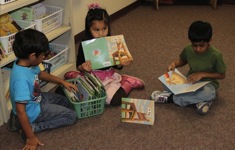
Three children on the carpet, each with a picture book, and the green crate of books right beside them, reads as a small-group setup rather than a whole-class lesson. The child in green is writing or marking the page while the others hold books up, which is a useful mix of reading and responding. The shelves in the background make it clear the books were pulled from a classroom library, not a single textbook.
Great post! This reminds me of how AI tools are making specialized tasks more accessible to everyone. Just like the guided reading approach here helps students learn independently, I recently found Demucs Online which does something similar for music—it splits any song into vocals, drums, bass, and other stems using the open-source Demucs v4 model on cloud GPUs. No Python or setup needed, just upload and get clean stems in about a minute. Really impressive how these tools lower the barrier for creative work.
The conversation around guided reading and independent reading time is a good reminder that engagement often depends on understanding each child’s temperament. For me, reflective tools like a Vedic astrology chart can be a fun way to think about personality patterns, though careful classroom observation still matters most. Thanks for keeping this discussion going.
The comment section here is lively, and it’s interesting how posts draw readers in even with a light topic. For anyone turning ideas into content, https://scriptmind.co is handy since it extracts text from YouTube, TikTok, and Instagram videos and helps create SEO articles and viral scripts in one click, no login needed.
This photo of a guided reading group says a lot: the kids are leaning in and every one of them has a text in hand. Small-group work like this is where you really see who is decoding and who is guessing. I sometimes make short visual story clips as a hook before a guided reading lesson, and they help the quieter readers join the conversation.
Really interesting perspectives shared here. The section on “guidedkatie235” was especially helpful. Car photographers might have fun with unforgettablecar-ai.com — it turns a single parked car shot into a smooth cinematic night-drive animation.
This little guided reading image is a good reminder of how much a simple visual cue helps during small-group lessons. I’ve been building picture cards for my own reading groups and keep a list of nano banana prompts so each set has a consistent style. Choice Literacy’s guided reading resources have been a big help for planning those sessions.
Great insights shared here, especially on the workflow side. The section on “guidedkatie235 – Choice Literacy” was especially helpful. For anyone experimenting with viral road-trip and meme video effects, hittheroaddude-ai.com automates the Hit The Road Dude template right in the browser.
Appreciate the practical breakdown in this article. The section on “guidedkatie235” was especially helpful. Side note on audio cleanup: I keep removebackgroundnoiseonline.com bookmarked for quick AI background noise removal on interview clips before final mixing.
Choice Literacy sounds like a solid resource for educators looking for weekly articles and insights, and the Big Fresh newsletter seems like a convenient way to stay connected with that community.
This thread is a masterclass in comment spam, but the underlying topic—guided literacy and engagement—is worth taking seriously. If you’re building tools that support reading and listening comprehension, accurate transcription matters. I’ve been using WhisperX to generate word-level timestamps and speaker labels from audio and video, then export clean SRT or VTT files for classroom use. It’s a practical way to turn read-alouds and discussions into searchable, accessible text.
I’ve been using guided reading time to let students create short scrolling announcements for book recommendations, and it keeps them engaged with text in a different way. For anyone looking to try something similar, the Scrolling Text Generator lets you make simple marquee or ticker text and export it as a GIF or embed. It’s been a handy, low-prep option for literacy stations.
Choice Literacy registers as a community of educators who lead, with free weekly articles and the “Big Fresh” newsletter as a nice way to keep the conversation going.
Love the photo of the kids completely absorbed in independent reading. For literacy stations we have had fun letting students design a book cover with simple banana prompts, and it gets reluctant writers talking about the story.
Choice Literacy seems like a useful community for educators who want to lead and share insights, and the free weekly newsletter sounds like a practical way to stay connected with new ideas.
The comment thread under this post has drifted far from the guided reading topic, and oisetrite’s point about independent reading time and early engagement is the one worth returning to. One practical caveat for anyone producing short video clips of classroom moments: platforms increasingly expect creators to label AI-generated footage, so build that step into your workflow rather than adding it later. We keep a labeling reminder in our own process, and the templates at zapvid.ai show how short vertical clips are assembled from a single photo.
While the article emphasizes scaffolding techniques, it might overlook how these methods can sometimes hinder students’ spontaneous problem-solving abilities in real-world scenarios. For example, over-structured guidance could limit creative thinking when facing unfamiliar content. From my experience, when students are required to innovate under constraints, their adaptability becomes more evident. Unrelated to the post itself, but anyone juggling this much scheduling might get something out of Photcraft AI Photo Editor — it’s what I ended up settling on.
While the article’s focus on scaffolding is insightful, it made me wonder how these strategies hold up when applied to older students who might already have developed problem-solving habits that differ from younger learners. In my experience working with high schoolers, rigid scaffolding can sometimes hinder their ability to think independently. Unrelated to the post itself, but anyone juggling this much scheduling might get something out of animate image to video — it’s what I ended up settling on.
I was intrigued by the concept of ‘Choice Literacy’ as it highlights how personal choice impacts our understanding and engagement with information. This resonates with how Tiny Desk Concert AI offers personalized insights by transforming individual creativity into professional videos, showing the power of personalized content.
The discussion around guidedkatie235 shows how varied blog conversations can be. For anyone evaluating gold jewelry or scrap, https://goldcalculator.pro provides a free calculator using the live gold rate to estimate value by weight and karat, helping readers make quicker, more informed decisions before selling or buying.
I liked the concrete detail in guidedkatie235. When I want a single scripture line without hunting through a chapter, I open this free random Bible verse generator, no signup: https://www.randombibleversegenerator.net
A short label from guidedkatie235 would look good as a 180-degree ambigram. I use this free generator, and it does not ask for an account: https://www.ambigramsgenerator.org
Aside from guidedkatie235, a clear portrait can become a 10-second clip with this Rumpelstiltskin dance generator. It is paid credits, not a free plan: https://www.rumpelstiltskinai.art
Great insights on guided literacy practices! As an educator, I’ve found that integrating quick, reliable self-assessment tools helps students build body awareness alongside academic skills—like checking pulse after active reading breaks or movement-based lessons. For a simple, no-app, browser-based heart rate check between activities, I recommend https://www.heartratetap.com
—it works instantly on any device with just a finger and camera. No signup, no ads, just accurate real-time feedback. Perfect for classroom wellness routines or student-led health literacy stations.
This is a great resource for understanding guided reading strategies. It reminds me of how AI can create engaging visuals, like with an AI kissing generator. AI kissing generator
Once you install it, a special menu appears inside the game. From there, you can change nearly everything. google games snake, New map shapes, different food items, custom snake colors, speed controls, and wall removal are all included.
Love how this site celebrates creative, student-centered learning! It reminded me of another fun, trend-savvy tool I recently tried: Fancy Cafe AI — a browser-based video generator that turns your selfie into a hilarious “POV: your first time in a fancy cafe” TikTok clip in seconds. No editing, no prompts—just upload, generate, and share. Perfect for educators or creators who want lighthearted, relatable content without the production hassle. Check it out and see why so many are laughing (and posting!) at https://fancy-cafe.com/
This conversation about guided reading and early literacy engagement is a great reminder of how much kids thrive when learning feels playful. That same instinct—turning participation into something fun and shareable—is exactly what makes the Angry Dance filter so addictive. Upload one photo and you’re dropped straight into the viral angry dance, same moves, same attitude. It’s a lighthearted way to join a trend without any editing skills. If you want to see yourself in the meme everyone’s talking about, give it a try at angrydance.video and share the result with your class or friends.
The discussion about children engaging enthusiastically with learning is encouraging. For anyone wanting to turn favorite portraits into shareable entertainment, visit https://rapaivideo.one: it transforms one or two photos into 15-second AI rap videos with beats, vocals, and synchronized lip movements, including popular Hotel Lobby-style trends.
I enjoyed the discussion about making learning engaging and interactive. It’s interesting how games can encourage curiosity, problem-solving, and independent exploration beyond the classroom. For anyone interested in classic games brought back to modern PC platforms, native ports, and community-driven preservation projects, PC recomp games is a useful resource. It features projects from several classic gaming systems, with compatibility information for Windows, Linux, and macOS. A great place to discover how beloved games continue to evolve for new generations of players.
I enjoyed the discussion around guided literacy and making learning more engaging. Visual creativity can also play a valuable role in helping educators develop interesting learning materials and classroom resources. For anyone exploring AI-powered creative tools, nano banana is worth checking out. It lets you edit photos, generate images, and create AI videos using multiple AI models, all in one platform. It could be a useful resource for creating engaging visual content and experimenting with new ideas.
I enjoyed the focus on making learning engaging and accessible. Interactive activities can be a great way to encourage curiosity and give students a refreshing break between reading sessions. For anyone interested in exploring classic games and discovering titles that run directly in a web browser, browser-based games offers a useful collection across different genres and platforms. I particularly like the idea of having compatibility details and control information available upfront, making it easier to find something enjoyable without complicated downloads or setup.
I appreciate the emphasis on making learning engaging and interactive. Just as guided reading encourages curiosity and independent exploration, interactive browser games can make leisure time more enjoyable too. For anyone who enjoys classic racing games, customizing cars, and exploring open-world street racing, nfsu2 is a fun way to revisit Need for Speed Underground 2 directly in the browser, without downloads or an account.
While reading about choice literacy, I noticed the intriguing concept of decision-making being discussed. This reminded me of how the Gas Station Dance AI Generator can assist in creating engaging and creative content, something that could enrich personal expression through dance.
The heading “guidedkatie235” on this Choice Literacy page caught my attention since guided reading is such a core part of early literacy instruction. I appreciate how the site treats scaffolding as something intentional rather than incidental, and it makes me think about how many different materials teachers juggle during small-group time. Even embroidery files can become teaching artifacts, and an embroidery file viewer like dst viewer helps check stitch detail and size before printing a preview. That kind of quick verification saves guesswork when preparing hands-on resources.
Thanks for sharing this—helpful context. On a separate note, I’ve been experimenting with AI music tools for short creative breaks between projects; BeMusic has been a simple text-to-song option if anyone’s curious.
I wonder if the article’s suggestion about scaffoldings applies equally to advanced learners, or if there’s a risk of oversimplifying complex concepts at certain stages. In my experience, overly rigid structures sometimes hinder nuanced understanding in specific subjects. Unrelated to the post itself, but anyone juggling this much scheduling might get something out of AI video generator — it’s what I ended up settling on.
The page for guidedkatie235 on Choice Literacy reads more like a navigation shell than an article: the body is mostly menus, contributor lists, and login prompts, with a “Loading…” placeholder where the actual content should be. It is hard to respond to any specific teaching idea because none is visible, which is a shame given the site’s focus on educators and literacy leadership. For anyone waiting on the page to resolve, a light browser distraction like doki doki pet simulator can fill the gap.
The comments here are a wild mix, but the underlying theme of guided practice and timing really resonates. It reminds me of the simple precision challenge in CoreBall JP, where you tap to launch balls at a rotating core without hitting existing pins. That same focused, repeatable practice builds real rhythm, much like literacy drills do for young readers. Worth a look for anyone who enjoys quick reflex games.
If you love word games like Wordle but crave deeper linguistic play—think double meanings, triple bridges, and nuanced synonym judgment—try Chainle.me. It’s a quiet, ad-free daily puzzle: five rounds, one word each, no login, no timer, just thoughtful English connections scored with care. Great for teachers, learners, or anyone who enjoys stretching vocabulary in under five minutes. No accounts, no distractions—just clean, clever brain fuel. Try today’s puzzle
That’s a nice shot — the composition really draws the eye, even at full size 235 × 150. I’ve been poking around similar image-heavy posts lately, and a friend pointed me to seteazero.app which pairs well with this kind of visual browsing. Curious if there are more from this series.
Love how this captures kids’ genuine engagement with early literacy—so encouraging to see! Also, AI Baby Generator is a fun little tool for curious parents.
Converting files can be frustrating. I’ve used the PDF to Excel feature at Image to Excel Converter & AI Data Extraction, and it’s been a lifesaver for organizing data quickly. Great for students and professionals alike! PDF to Excel
As a Fortnite player grinding Treasure Hunters quests, I’ve found ChestStats indispensable for tracking chest counts accurately—no Epic login needed, fully browser-based, and even supports squad sync for real-time progress sharing. It handles manual taps, match totals, quest readings (like 51/100 → 63/100 = +12), and local backups via JSON. Plus, handy extras: Treasure Hour schedule, Pirate Token odds calculator, and chest map preview. If you care about your actual chest count—not just guesses—give it a try: ChestStats.com
This little guided-reading visual is such a nice touch for a lesson slide. I record short clips for my guided reading slides at home and the quality is usually pretty rough, so I just run them through video2x to clean them up and sharpen them without opening an editor. Definitely worth a look if you also make small video clips for your classroom.
Last week I was prepping slides for my reading groups and had a bunch of blurry video clips I needed to clean up. Gemini Omni did a decent job reworking them so I could actually use them in class. Saved me a lot of time compared with hunting down new footage.
Really enjoyed this post — the point about kids being genuinely engaged and studying hard resonates. It reminded me of how Genjutsu AI lets a still photo pick up the motion from a clip, which is a fun way to keep that playful energy going. Worth a look: Genjutsu AI. Thanks for sharing!
Every tcome back to this thread I think about the Doodle Baseball clip I pulled for my small group lesson last month — the file was so low res that it looked fuzzy on the projector, which isn’t great when you’re trying to keep third graders reading the prompts. I’ve started running my recorded classroom snippets through Bernini Video on my own machine before they go on slides, mostly to clean up the shakier ones, and it runs locally which is nice since I can’t upload student videos anywhere. Still figuring out the best settings for really old clips, but it beats the free upscaler I was using before.
Guided reading groups are so much easier when every student has a text at their own level — nice to see that structure highlighted. On a side note, https://rapaivideo.org/ turns a photo into a short AI rap video in the browser; I made one to celebrate a class reading milestone and the kids loved it.
When I was pulling together slide material for a small group lesson, I had a bunch of screen recordings of the baseball Doodle that were way too heavy to email to the families. I ran them through the MOV to MP3 converter so I could just drop the audio into a listening station instead. Took about two minutes and saved me from bugging our tech team.
Great insights on guided literacy practices! As an educator, I’ve found that integrating quick, reliable self-assessment tools helps students build body awareness alongside academic skills—like checking heart rate after active reading or movement breaks. For a simple, no-app, browser-based solution that works on any device, I recommend trying https://www.heartratetap.com — it’s fast, accurate, and perfect for classroom wellness checks.
If you love quick, brain-boosting word games like Wordle or Foodle but crave something fresher and more strategic, try Krillion Forever — a free, no-signup trivia challenge where rare answers score big. Think rarer, dive deeper: each 25-second prompt rewards obscure-but-valid responses across geography, sports, and more. No ads, no downloads, works on any device. Perfect for teachers looking for engaging literacy warm-ups or students who enjoy playful recall practice. Give it a go and see how far down the ocean you can go: Krillion Forever
It’s great to see the kids so engaged and working hard on their reading. I’ve been experimenting with Genjutsu AI to put photos into viral video clips, and it’s a fun way to bring still images to life. If you’re curious about motion and visuals, you can check it out here: Genjutsu AI. Thanks for sharing this post!
Could you give this image a descriptive caption and link to its related teaching resource? The attachment title guidedkatie235 does not make its educational context clear.
The photo shows a small group gathered around one table. For a guided reading group like this, what cue helps you decide when to let students work through a difficult passage together and when to step in?
When I buireading slides I always end up reusing low-resolution pictures and short clips from old files, and cleaning them up for the projector takes way longer than it should. Running the visuals through a quick converter before they go on the screen made a noticeable difference for the kids in the group. I keep a small list of handy tools on my duoduo Sanity profile when I need to find something new.
The heading on this page reads simply guidedkatie235, which makes it hard to tell at a glance what the article covers, though the Choice Literacy context suggests a teaching focus. My own experience with literacy coaching has been that the most useful resources are the ones that explain the reasoning behind a routine, not just the routine itself. If the piece digs into how a guided reading group actually runs, that detail would be worth spelling out. Readers who want to understand how their own working style affects small-group instruction could try a strengths assessment to see where their instincts lie. Either way, the Choice Literacy framing points to a practical classroom angle worth developing.
I waspping guided reading slides and kept butchering the photos I cropped for our story map — the faces ended up looking squished on the projector. The PSL Scale Test was a quick way to check whether a photo was actually usable and how the framing was throwing the proportions off, and it didn’t need a sign-up. I didn’t use the ranges for anything fancy, just as a sanity check before dropping an image into the deck.
Just took the “What Dere Am I?” quiz — such a clever, story-driven twist on personality tests! Instead of dry questions, it walks you through a sweet, rain-soaked school-day scenario with your crush, and each choice reveals how you *actually* show affection. No sign-up, no email, just instant, shareable results (I got Deredere 🌟). Perfect for book clubs, PD breaks, or sparking lighthearted reflection on emotional expression. And yes — it’s surprisingly insightful, even for educators who think about how students communicate care. Try it yourself: What Dere Am I?
Hey, when I was prepping slides for my reading group I kept coming back to this page for the classroom visuals. I used an image text remover to clean up the low-res images before I dropped them into the slides, and it saved me a lot of editing time.
Love how this captures kids’ genuine engagement with early literacy! The focus on independent reading time is so important. For anyone exploring creative learning spaces, AI Room Design is worth a look.

 Loading...
It seems that the children are very interested and studying hard. Google Doodle Baseball
Great post! For photos that look dull, I use a free HDR photo enhancer to bring out detail and make the colors pop.
Thanks for sharing! Anyone needing format conversions should try File Convert Factory, free and easy to use.
Great read. Cat lovers should try the cat calculator, quick and surprisingly accurate.
Awesome write-up. Rhyme Game makes rhyming feel like a game, perfect for quick breaks.
Great post! If you are into daily puzzle games like Wordle, Rule34dle is a fun new challenge I play every morning.
It conveys themes of literacy development, independent reading time, and early learning engagement, which are all critical components of a guided reading approach. For example, from 1970s arcade machines to smartwatches, snake game thrives on any device.
After reading your site, I became really fascinated in what you said. Kindly send me sufficient specifics Baseball Bros IO.
That’s great to hear! Kids’ enthusiasm is key. I remember loving Google Doodle games as a kid. It made learning fun.
Great article! The guided literacy tips are clear and practical. I especially love how you mentioned using engaging tools like soundboard and meme soundboard unblocked to make learning interactive. For trending sounds, check out the latest audio clips and download them at SoundBoardW.com totally free soundboard, soundbutton, and sound board free options!
At the moment, downloading videos from TikTok without a watermark is against the site’s rules. This is because content on TikTok goes to the person who made it and can’t be shared or used without permission. run 3
This article highlights the joy of guided learning, much like how Doodle Baseball https://doodlebaseball.info brings joy to players by merging sports and fun characters. It’s a unique blend that enhances engagement!
The idea of combining baseball with food characters is brilliant! It adds a fun twist to the game, making it perfect for all ages. I recently discovered a similar fusion of creativity and sports in Doodle Baseball, where players can enjoy the classic sport with a whimsical touch. It’s a hit among fans!
Interesting post! I was curious about the name “guidedkatie235”-does it refer to a specific learning framework or classroom setup? I’ve been exploring AI-assisted tools like Deep Seek lately to analyze teaching styles and content patterns, and it’s amazing how naming conventions often reflect a deeper educational approach. Would love to know more about the idea behind this!
Really enjoyed the ideas! This always inspring to see fresh ways to support everything
Foodle is an unofficial version of Wordle created by Daniel Anyanwoke. It takes inspiration from guessing words within the 5 character limit.
The amount of spam bots in these comments is actually insane. Are we just going to ignore that this isn’t even a real blog anymore.
Appreciate the insights on guidedkatie235. The note on Previous Image Next Image guidedkatie235 October 19, 2018 235 × 150 was helpful. [AI Image Generator, Image-to-Image](https://imagetoimageai.org) has been helpful for fast transformations.
That image looks interesting; I’ve been looking for a tool that simplifies the image generation process. I might check out [online text-to-image](https://trybananaai.com) to see how their preset workflow works.
Such a lovely moment—encouraging kids to read and explore books at such a young age is truly wonderful!
That looks like a useful tool for quickly generating video content from product photos. I can see how [SceneWeaver AI](https://sceneweaverai.com) would save ecommerce teams a lot of time.
Nice write-up on guidedkatie235. The note on Previous Image Next Image guidedkatie235 October 19, 2018 235 × 150 was helpful. If you’re into AI image editing, [AI Sticker Maker, Photo to Sticker Converter](https://phototosticker.online) works well for quick iterations.
Slope Game offers a blend of relaxation and challenge, helping you maintain your interest while simultaneously improving your skills.
Restore Old Photos is a professional service that brings your precious memories back to life with advanced photo restoration technology
Brat Generator allows you to generate viral minimalist green cover images.
Ai Photo Enhancer helps you improve photo quality online with one click.
Concrete Calculator is a free online tool that helps you quickly estimate concrete volume for slabs, footings, and foundations.
AI Image Editor Pro offers an advanced AI-powered photo editing experience.
HEIC to JPG is a free online tool that allows anyone to quickly and easily convert HEIC images to JPG format.
Image to Image AI provides a simple drag-and-drop interface that lets anyone generate high-resolution, AI-enhanced images in seconds.
square face generator lets you create cute pixel art avatars for free — no login required, instant 256×256 PNG download for Discord, Twitter, and TikTok
Brat Generator – Free Online Brat Style Cover Text Generator.
Concrete Calculator provides fast and accurate concrete calculations in cubic yards, cubic feet, and cubic meters.
Ai Photo Enhancer enhances images by increasing clarity, sharpness, and details.
AI Image Editor is a powerful AI image editor for restoring and enhancing images.
Use this free square face generator to design your own pixel avatar with 200+ customization items across 12 categories and download it instantly
Image to Image AI is a powerful online tool that transforms any picture into a new, enhanced, or stylized version using cutting-edge AI technology.
I really appreciate the focus here on early literacy and guided reading—it’s such a critical foundation. For bilingual families or those teaching Chinese, one often overlooked challenge is mastering tones, which can feel abstract at first. I’ve found that blending playful, game-like practice really helps cement those skills. Your readers interested in making tone practice more interactive might find the approach discussed on interactive Chinese tone drills useful—it uses spaced repetition and mini-games to build natural recognition without drilling.
The discussion around guided literacy and early engagement is really interesting—visual aids can play such a key role in reinforcing concepts for young readers. For example, in science and STEM education, pairing diagrams or data charts with reading materials helps students make stronger connections. I’ve been using a tool called Figcanvas to quickly generate scientific illustrations and data visualizations; it even supports code-generated graphs and flowcharts, and exports to SVG for further editing. That kind of resource could be a game-changer for educators creating custom teaching materials, turning what used to take hours into a few minutes. If you’re looking for a way to bring more visuals into your lessons, you might want to check out this science diagram maker to see how it streamlines the process.
Choice Literacy is such a valuable resource for educators! The focus on making thoughtful, evidence-informed choices in literacy instruction is exactly what teachers need. Resources like this help bridge the gap between research and classroom practice.
Nice write-up on guidedkatie235. The note on Previous Image Next Image guidedkatie235 October 19, 2018 235 × 150 was helpful. If you’re into AI image editing, [try Img2World](https://img2world.com) works well for quick iterations.
Thanks for sharing this on guidedkatie235. The note on Previous Image Next Image guidedkatie235 October 19, 2018 235 × 150 was helpful. I use [try Photo to Sticker](https://stickerbeam.com) for image-to-image tasks — simple and free.
Interesting discussion here. For anyone researching health-related geographic data, I recently came across https://hantavirusmap.one/pl which offers some useful regional insights. Staying informed about environmental health risks is just as important as literacy and early learning — both require reliable sources and community awareness. Great to see engaged readers sharing perspectives in the comments!
Excellent content! Thanks for sharing this helpful information AI Image Generator about Best AI Image Generator. I learned a lot!
Excellent technical breakdown! You managed to make a complex topic feel accessible without oversimplifying it. The analysis is thorough and the insights are genuinely valuable.
Great insights on guided reading and literacy instruction. I appreciate the practical strategies and thoughtful reflections—posts like this provide valuable ideas that educators can apply directly in their classrooms.
What an insightful exploration of guided reading! I’m curious, how do you think integrating technology, like what’s found at slope-2.io, could enhance student engagement in these methods?
That phrase about children being “very i…” really stood out—it makes me wonder if we sometimes overlook how their natural curiosity drives deeper learning. What strategies have you found most effective for harnessing that innate interest during guided reading sessions?
nano-bananapro
I’ve noticed similar moments in my own practice—when I let students steer the conversation during guided reading, they often uncover connections I hadn’t considered. It makes me wonder how much deeper learning goes when we resist the urge to always lead.
nano-banana2
Applying this idea to my own guided reading groups, I’ve started handing students the sticky notes before we begin—letting them flag what they wonder. It’s shifted my planning from pre-selected questions to just listening for their natural curiosities first.
seedance2-5
The image really highlights the focused engagement of the children during what looks like independent reading time. It brings to mind how crucial it is to foster that intrinsic motivation for learning. I’ve noticed similar concentration when my own kids are engrossed in a game, and I wonder if we can channel that same energy into literacy. It’s impressive how much detail goes into understanding these educational approaches; I found a similar perspective on Pokopia Crystals that discusses how structured environments can still encourage individual discovery, which seems to be what’s happening here.
The image really highlights the focused engagement of the students. It’s interesting how the author frames this as “guidedkatie235” – it makes me wonder about the specific strategies or prompts Katie might be using that lead to such absorbed participation. I’ve noticed in my own experience with educational games, like how sometimes a simple, repetitive mechanic can be surprisingly captivating, much like the core loop in Crossy Road Online; it’s a different context, of course, but the principle of sustaining attention through a clear, achievable goal seems to apply. This visual is a great reminder of how impactful direct observation can be in understanding classroom dynamics.
I really appreciate the focus here on early literacy and guided reading—it’s such a critical foundation. For bilingual families or those teaching Chinese, one often overlooked challenge is mastering tones, which can feel abstract at first. I’ve found that blending playful, game-like practice really helps cement those skills. Your readers interested in making tone practice more interactive might find the approach discussed on subnautica2wiki useful—it uses spaced repetition and mini-games to build natural recognition without drilling.
The image really highlights how engaged the children are, especially the focus on that one student with their hand raised. It makes me think about how crucial that spark of curiosity is in learning. Keeping kids interested and fostering that desire to participate is such a big part of effective teaching, whether it’s in literacy or any other subject. It reminds me of how some resources can really help keep that engagement high; I found a similar perspective on OrbitDash CC that complements this well, emphasizing fun ways to keep young minds active.
Ha, the “from 1970s arcade machines to smartwatches” line made me laugh — I spent way too long last month trying to hook up something I read about literacy apps to an old iPod Touch for my kid, but the battery died after 20 minutes. Not 100% sure that’s the same engagement they’re talking about here though.
I appreciate how you break down the guided process here. For staying on track, Sete a Zero has been a helpful resource for refocusing my intentions. Thanks for sharing this perspective.
I love how this image captures that quiet morning mood — it reminds me of a tool I’ve been using lately, https://seteazero.app, which helps me stay focused during creative work. Do you often edit photos for that calm, minimalist feel?
This blog post is exceptional Skribbl IO! Insightful and exceptionally detailed. I am eager to acquire additional information.
The comment about using soundboards reminded me of something I tried last spring with my kindergartener — I used a free animal-sound app during letter-sound drills. worked for about two weeks before she got bored.
This is really helpful! I often need to blur sensitive info in screenshots before sharing online. Tools like https://blurphoto.net/ make it super quick and easy — just upload and done. Great supplement to the tips here!
I like how guided reading and literacy discussions here keep the focus on practical learning and real classroom use. The comments show this page still draws people looking for useful ideas, which makes it a good fit for sharing related creative tools. If you enjoy personalized design experiences, you may also find AI-powered nail art ideas tailored to your taste worth exploring.
I enjoyed reading “guidedkatie235” because it turns a specific subject into something approachable and easy to follow. The practical details and personal perspective give readers a useful reason to pause and think beyond the headline. That attention to small visual signals also reminded me of Sprite Tracker, a light example of how one simple movement can carry a surprising amount of meaning. Thanks for sharing such a thoughtful and clearly presented piece.
This image really captures the style I’ve been looking for in my own projects. I found a useful tool at https://seteazero.app that helped with similar designs. Thanks for sharing this.
The emphasis on children’s engagement and independent reading time gets at an important part of guided literacy: young learners need both thoughtful support and room to explore. Creative, interactive activities can complement that approach by making experimentation feel purposeful, which is also the appeal behind WHA Spell Simulator.
https://www.pngcropper.com
PNG Cropper is an online image tool that helps users crop PNG files quickly and easily. It is useful for designers, social media users, and anyone editing transparent images. The tool provides a simple solution for fast visual adjustments.
Such a valuable resource for literacy educators. Guided reading strategies like these make a real difference in helping students build reading confidence. Thank you for sharing these practical insights!
So many options here to dig into—it’s a bit overwhelming, honestly. If you’re into games, check this out for something fun: palworld breeding calculator 1.0.
This is super helpful, thanks! Also worth checking out: head-football – fun head-to-head soccer game, totally free to play.
Looks like there’s a lot to dig into here. If you’re into creating engaging content, you might wanna check this out for some cool video options—minimax h3.
This really took me back to my own classroom days—watching kids get completely absorbed in a story or a game is such a special thing. I love how you highlight that enthusiasm is the real engine behind early literacy, and the guided reading tips here feel so doable. It reminds me of how my own students would light up when we turned a tricky passage into a little puzzle. For anyone working with multilingual learners or trying to keep that spark alive, a tool like Manga Translator can be a fun bridge to bring visual stories into your reading time. Thanks for sharing such a thoughtful approach!
Great perspective on fostering student choice in literacy workshops. Adding visual creativity can deepen engagement, and a quick way to turn sketches into pixel art helps with that. Check out wplace pixel for an instant, privacy‑first converter using the official palette.
Your post on choice literacy is thought-provoking. As someone interested in creative tools, I’ve found Motion Control AI to be a game-changer for bringing ideas to life. Check out motion control ai free to explore how it can elevate your content creation.
this looks like a really fun way to learn
The Previous Image angle here feels practical, with Google Doodle Baseball oisetrite says: April 16, 2025 at 10:06 am It conveys themes keeping it from sounding templated. postergenai is easy enough to come back to later.
The way Previous Image is explained here feels pretty natural, and For example, from 1970s arcade machines to smartwatches, snake game thrives on any d makes it feel less generic. When I circle back, family photo editing ai will be easy to grab.
I like how Previous Image is handled here; For example, from 1970s arcade machines to smartwatches, snake game thrives on any d makes the whole thing feel more human. AI Images Editor feels worth saving for a quick reference.
This note on Previous Image reads naturally, and For example, from 1970s arcade machines to smartwatches, snake game thrives on any d is what gives it a real-world feel. I’ll probably revisit translate by image when I need it.
I like how Previous Image is handled here; Previous Image Next Image guidedkatie235 October 19, 2018 235 × 150 72 thoughts on g makes the whole thing feel more human. Photo to Video feels worth saving for a quick reference.
This note on Previous Image reads naturally, and Google Doodle Baseball oisetrite says: April 16, 2025 at 10:06 am It conveys themes is what gives it a real-world feel. I’ll probably revisit Virtual TryOn when I need it.
Your post on fostering student choice in literacy is always insightful! If you’re looking to enhance Minecraft builds with precise circular designs, our tool simplifies creating perfect circles for structures like arenas or domes. Give our circle generator minecraft a try for instant previews and copyable coordinates.
Nice article! Found a handy tool here too: file-convert-factory. It saved me a lot of time.
kids look so engaged, awesome
This resonated so deeply with me as a parent! I use https://minimaxh3.info/ to create short animated clips from my kids’ stories — the video quality is amazing. Thank you for sharing your experience!
pretty cool how they’re making it fun
I really enjoyed reading about guided reading and literacy development on your site. It reminded me of how important independent reading time is for young learners. By the way, I recently tried a free online tool at ObjectRemover AI that removes objects from videos, which might be useful for creating engaging educational content.
This resonated so deeply with me as a parent! I use https://minimaxh3.info/ to create short animated clips from my kids’ stories — the video quality is amazing. Thank you for sharing your experience!
I really enjoyed reading about guided reading and literacy development on your site. It reminded me of how important independent reading time is for young learners. By the way, I found a useful tool for removing unwanted objects from videos at ObjectRemover AI.
This gave me a completely new perspective. Thanks for the eye-opening read!
i love seeing kids excited about reading
this makes reading seem way less intimidating
Palworld wiki
always good to find new ways to help kids learn
send a digital CD
[object Object]
Navigating through different blog posts is a great way to discover new tools for unwinding after a long day. If you are looking for a simple way to transition into a peaceful evening, using an AI ASMR generator to create custom sleep sounds or relaxing whispers can be incredibly helpful. It is a neat concept for anyone interested in personalized meditation and relaxation audio.
Great layout on this page. Navigating through helpful lifestyle tips always gets me thinking about daily self-care routines. For anyone looking to optimize their skincare, trying a free skin analyzer is a quick way to get personalized insights and routine guidance using just a selfie.
wish i had something like this when i was a kid
Create a memorable SBTI avatar
This guide on literacy strategies is very helpful. I also found a great tool for physics class called free body diagram maker
This page celebrates early literacy and guided reading, sparking conversation among educators and parents about engaging young learners. If you’re equally passionate about supporting everyday wellness—especially for adults managing joint stiffness or seeking comfortable, stylish relief—you might appreciate what we offer at MagnetPure.
We specialize in solid copper bracelets embedded with neodymium magnets, designed for daily wear and marketed to support joint comfort and circulation. Whether you’re treating yourself or picking up a thoughtful gift for someone 40+ dealing with arthritis-like aches, our pieces blend practicality with a clean, classic look.
Just as this post encourages foundational habits in children, we believe in simple, consistent routines for adult self-care. If you’re curious about adding a wellness accessory to your day, feel free to browse our collection at MagnetPure.com—no hype, just honest craftsmanship.
that’s a neat idea for guided reading
Hytale Tools
This post really resonated with me, especially the part about kids' enthusiasm being the key to learning. I remember how my own students lit up when we turned reading into a game, and it made all the difference. It's funny how those little moments of joy can spark such a deep love for literacy. Speaking of making things clearer and more engaging, I recently found a tool that helps bring old, blurry images back to life, which is perfect for creating vibrant classroom materials. You can unpixelate image online free and it's surprisingly easy to use. Thanks for sharing such thoughtful insights on guided reading!
Thanks for sharing this page. For those interested in exploring music creation in a new way, you might check out gesture synth.
I really enjoyed seeing this image — it’s got a calm, thoughtful mood to it. By the way, if you’re into this kind of visual exploration, I’ve been spending time on choicervoicer.app lately, and it has some thought-provoking stuff that reminds me of this post.
Interesting image — it made me think about how we perceive sound in visual form. A friend once shared a thoughtful take on that exact idea at こえ、はかる, which pairs well with this post.
It’s always refreshing to see a guided reading teacher so genuinely engaged with her students — that kind of enthusiasm really carries the classroom. I especially appreciate the small moments she captures here, the ones that build confidence over time. Looking forward to reading more of her posts.
I really enjoyed reading about guided reading and literacy development. Your article reminded me of the importance of independent reading time. By the way, I found a great tool for creating pixel bead patterns at pixelbeads – it’s free and easy to use.
The resolution point is the one people get wrong. A 72 dpi screenshot dropped into a 300 dpi TIFF is still 72 dpi, and reviewers do notice. This practical guide to scientific figures lists column widths and font sizes per publisher. Saved me a resubmission.
https://sites.google.com/view/generatoryonline/
Uwa?am, ?e ta strona jest naprawd? pomocna, bo wszystko pozostaje proste i praktyczne. Informacje s? ?atwe do zrozumienia, a ca?o?? wygl?da jak narz?dzie do codziennego u?ytku.
I really enjoyed reading about how engaged the kids are with their literacy work—it reminds me of the joy I felt when I first discovered interactive tools that made learning feel like play. The way you connect independent reading time with early learning is so important, and it’s clear you’ve put a lot of thought into your guided reading approach. Speaking of tools that make practice more fun, I’ve found that having a reliable tuner can be a game-changer for music-related literacy activities, like teaching rhythm or pitch through song. If you ever explore sound-based learning, this drop C tuner is a handy resource to have on hand. It’s simple to use and can help kids hear the difference in tones, which ties beautifully into phonemic awareness. Thanks for sharing such practical ideas—I’m excited to try some of them with my own students!
https://sites.google.com/view/myheroacademiaquirkgenerator-c/
What I like most is that it makes a fairly ordinary task much easier. The interface is clean, and the whole experience feels smooth.
Interesting discussion thread. If you sell on Amazon, https://shotmora.com turns one product photo into a full listing image set with main images, lifestyle shots, infographics, comparison visuals, and A+ content, so you can review everything before export and save a lot of time on creative production.
Really enjoyed reading this detailed guide about guidedkatie235! The insights and perspectives shared here are super practical. For anyone exploring creative photo tools and AI styling, AI Clothes Changer is also a fantastic resource worth checking out.
Clear navigation always makes exploring blog archives much smoother. When it comes to discovering public content across platforms without needing an account or app, tools like an anonymous tiktok viewer offer a similarly lightweight way to check public tiktok stories directly from a browser. Appreciate the organized setup on this site!
I really enjoyed reading about how the kids in your guided reading group are so engaged—that kind of enthusiasm is contagious. It reminds me of how my own students light up when they find a puzzle that clicks, whether it’s a word game or something more hands-on. For those moments when a little extra challenge is welcome, I’ve found that a 3×3 cube solver online can be a fun way to keep that problem-solving spark alive. It’s amazing how a simple twist of colors can teach patience and logic, just like decoding a tricky sentence. Thanks for sharing such thoughtful strategies for early literacy!
The listed 235 x 150 dimensions are easy to overlook. I check image size first when deciding whether a visual will fit a small project.
This guide on literacy instruction is very helpful. I often use tools like this to extract stills at videotoframes.net
This guide on literacy instruction is very helpful. I often need to extract clear images for my own teaching materials using Captura de fotograma
This is a great look at guided instruction. I have also been exploring visual consistency tools like this guide on using reference images for AI video
This is such a helpful resource for literacy instruction. I have been using a great automatic typer for google docs
I really appreciate these insights on guided literacy instruction. It is just as artistic as practicing traditional thuluth calligraphy styles
This really made me think about how guided reading can keep kids engaged when the material actually feels interactive and not just repetitive. I could even see something like Pokemon Lazarus being used as a fun hook to get reluctant readers into the same kind of literacy and independent reading time the article is pointing at.
The comparison table was super helpful. ai ghost mannequin also does great ai ghost mannequin comparisons.
Buen resumen de guidedkatie235, mas completo que otros que he leido. En otro orden de cosas, hice una pequena guia sobre escapa del mono codigos que a lo mejor le sirve a alguien que pase por aqui.
Good article. The ideas in “guidedkatie235 – Choice Literacy” connect well with what I have been researching recently.
Appreciate the detail in this post, not the usual surface-level rundown. Adjacent to this, I’ve been documenting Blood Dungeon roguelite dungeon crawler on the side, figured I’d mention it in case it’s useful to someone here.
Good write-up, bookmarked for later. Been meaning to mention — Big Ambitions 1.0 dropped recently and changed the starting-business math quite a bit, so I’ve been re-testing which businesses are actually worth opening first now.
This post highlights the importance of targeted practice, but I’m curious if the author has encountered challenges when the specific skill isn’t easily isolated. Sometimes in my own work with creating images, I find that broader AI image creation tools are more practical than trying to perfect one niche technique. It’s been a learning curve, but having a versatile AI image editor has streamlined my workflow significantly. Slightly off topic, but if you ever deal with text to image, AI image creation tools is what I ended up settling on and it has saved me a fair bit of time.
I really enjoyed reading about how the kids in your guided reading group are so engaged—it reminds me of the same spark I see when my own students get lost in a book. The way you connect early literacy with independent reading time is spot on, and it’s clear you’ve put so much thought into fostering that love of learning. I’ve found that visual aids can make a huge difference in keeping that momentum going, especially when kids are creating their own reading responses. That’s why I love using Phototext to add text to their artwork or photos of their favorite book scenes—it makes their thinking visible and shareable. It’s such a simple tool, but it really helps them feel proud of their work and excited to explain it. Thanks for sharing such practical ideas that I can’t wait to try in my own classroom!
The emphasis on explicit instruction in guided reading is well-taken, especially for complex texts. I’m wondering if the author has found specific nuances when dealing with texts that require inferential reasoning, as those skills can be harder to directly model. It’s a challenge I’ve grappled with when teaching comprehension strategies. For anyone looking to streamline content creation, particularly for e-commerce, a robust AI bulk product image generator has been a game-changer in my workflow.
The article’s focus on scaffolding skills in guided reading is crucial, but I’m curious about how the author manages to differentiate instruction when students have vastly different foundational knowledge. For instance, when introducing a new reading strategy, the readiness levels can vary dramatically. Sometimes, I find that having a tool to quickly generate diverse practice materials is key. It’s been helpful for my workflow, and anyone else in content creation might find Open Sora surprisingly versatile for visual assets.
The article’s focus on explicit instruction in guided reading is valuable, especially for foundational skills. I’m curious if the author has explored specific strategies for students who struggle with phonological awareness, as that seems like a particularly tricky area to scaffold directly. Sometimes, I find that having a tool for quick, AI-assisted generative video asset creation can really help illustrate abstract concepts for learners. For anyone else in content production looking to streamline visual workflows, generative video asset creation offers some surprisingly powerful capabilities for diverse projects.
I really appreciate these insights on literacy instruction. It is so helpful for my design work using a free image to SVG converter
Nice writeup, thanks for the detail. Unrelated, but I’ve been documenting a new roguelite dungeon game’s arenas and mechanics on a small wiki, just posted an update: https://blood-dungeon.wiki/arenas
Appreciate the detail here, cleared up a couple things I’d been unsure about. Off-topic, but I maintain a Roblox trading-game guide covering current codes and rarity tiers, just posted an update: https://stealanegg.co/codes
Thorough writeup, more than the usual pass on this topic. Off-topic, but I maintain a pricing/value reference for a Steam trading game, recently refreshed: https://fellandsell.wiki/pricing-guide
Good breakdown, more careful than most takes on this. Different topic, but I keep a wiki for a co-op grinding RPG covering the hero roster and builds, just updated the heroes page: https://mypartyisgrinding.wiki/heroes
Solid writeup, more detail than usual on this. Separately, I run a guide for a business-sim game and just posted notes on the best starting business options: https://bigambitions.wiki/best-starting-business
The article touches on the importance of explicit instruction, but I’m curious about the balance with implicit learning. Are there instances where over-scaffolding might inadvertently hinder a student’s ability to develop independent problem-solving skills? It’s a delicate line to walk. For anyone juggling complex content creation workflows, managing diverse visual assets has become easier for me using seedreamproai.com, especially for achieving precise editing.
Great insights on guided literacy! Engaging young learners with visual tools is key to their development. For educators looking to create clear, professional diagrams and scientific illustrations for their lessons, [SciDrawer](https://www.scidrawer.com) is a fantastic resource to enhance classroom materials.
Useful post, thanks. Different topic, but I keep a Kaiju Alpha wiki with the monster stats and spawn timers, updated after each Roblox patch: https://kaijualpha.com/wiki
I liked the point about independent reading time and how engaged the children seemed during guided reading. The mix of literacy development with familiar digital references made me think about how tools like TopView AI / can support clearer learning materials when used thoughtfully.
I liked the point about children staying engaged through independent reading time, since the right visuals can make early literacy activities feel more inviting. For teachers preparing scanned worksheets or picture prompts, Bigjpg AI Image Enlarger Bigjpg AI Image Enlarger – How the AI Image Enlarger Works, could be a useful related resource for making images clearer before class.
This tool is perfect for reviewing independent reading progress. The route map editor makes it easy to visualize study patterns, just like Google Doodle Baseball brings fun to learning. I love how privacy-focused it is. Baseball Bros IO would be a great addition too! route map editor
For anyone comparing agent frameworks, this Hermes Agent AI review covers the tradeoffs pretty clearly: https://www.openaitoolshub.org/en/blog/hermes-agent-ai-review
I just read your insightful post on guided literacy and it really resonated with me! The way you talk about making learning fun through games like the Google Doodle Baseball is something I can relate to. It’s amazing how these tools can make reading and learning engaging for kids. I recently discovered Musefy – Free AI Music Generator for Songs and Lyrics, and it seems like a fantastic resource for adding another layer of creativity to learning.
To simplify this process, many parents use an online calculator that automatically handles lunar conversions.
You can check your Chinese lunar age and prediction here: Chinese Gender Calendar by Age Calculator
The article’s emphasis on breaking down complex reading skills into manageable steps is spot on. I often wonder about the long-term impact on metacognition when students become overly reliant on specific scaffolding techniques. While essential initially, fostering independent strategy selection is the ultimate goal. For anyone exploring new ways to generate content, I’ve found some creative audio tools can really spark unique ideas. It’s been a great way to experiment, especially when you need fresh inspiration for different projects. Slightly off topic, but if you ever deal with AI song generator, some creative audio tools is what I ended up settling on and it has saved me a fair bit of time.
The article’s breakdown of scaffolding techniques is crucial for developing reading fluency. I’m particularly interested in how teachers differentiate these strategies for students with varying processing speeds. It’s a complex task that requires constant adjustment. For those of us involved in content creation, finding efficient ways to generate assets is always a goal; I’ve found some AI music song creation tools can really accelerate idea generation for background scores or even thematic jingles. Slightly off topic, but if you ever deal with Suno AI, AI music song creation is what I ended up settling on and it has saved me a fair bit of time.
Thanks for sharing this update. When archiving updates or referencing content across different professional networks, keeping track of scheduling and timing can be tricky. If you ever need to audit share history or decode LinkedIn timestamp details directly from post links, having a simple way to verify the exact timing is always helpful. Looking forward to your next post!
This really feels like a snapshot of early guided reading in action, especially with how much focus there is on kids staying engaged and working independently. It made me think of narinig mo ba too, since even simple routines and “everyone at their own pace” moments can end up hiding a bigger story about how people learn.
The article highlights the value of explicit instruction, but I’m curious about how educators balance this with fostering a student’s innate ability to discover patterns independently. Is there a point where too much guidance might inadvertently stifle creative interpretation? For those of us managing large volumes of creative work, I’ve found that using a batch image creation tool really streamlines the process of generating multiple visual variations from detailed prompts.
Great insights, thanks for sharing. – ccverify75242
I liked the focus on children staying engaged through independent reading time and early literacy activities, even alongside playful references like Google Doodle Baseball and Snake. For teachers creating visuals to support guided reading, Veida AI’s ChatGPT Image Prompts ChatGPT Image Prompts could be a useful companion resource.
Worth knowing that R, Excel and SPSS do not agree on Q1, so the same data can give you three slightly different boxes. The whiskers are the standard part, reaching 1.5 times the IQR. These worked box plot examples show the difference side by side.
I’d rather see a newsletter packed with practical teacher tips than one loaded with decorative extras. That’s why the focus on 20,000 educators sharing leadership ideas feels more useful than flashy presentation. For a simple newsletter header, nano banana 2 could give a few visual variants without changing the message.
I like the attention this article gives to guidedkatie235 – Choice Literacy; game references are most useful when they explain what is known and leave uncertain details clearly marked. For readers looking up documented equipment, skills or quests, this Dawnwalker weapons and skills reference keeps those topics in one independent reference.
It’s funny how Borro’s miniature scale forces you to notice details you’d miss in big cities—that same intimacy works for video content. For busy creators, keeping visuals consistent without a camera is tough, so tools like faceless reels help replicate that “small world” charm with AI. Great read on capturing essence over size.
It’s interesting to hear about Katie’s experiences, and I find myself wondering how the teachers manage to document all of those specific learning moments during the day. I’ve always thought it would be neat to have a choicer voicer dub maker to narrate those classroom anecdotes.
That 235×150 thumbnail is tiny — is there a full-resolution version hiding somewhere? The title “guidedkatie235” has me curious what the actual photo is. I stumbled on krilliongame.app recently and it scratched a similar itch for random image rabbit holes.
It is helpful to have Restore Old Photos online before deciding whether a damaged or black-and-white photo needs a more specific workflow.
Just discovered GestureSynth.me — a brilliant, privacy-respecting browser instrument that turns hand gestures into expressive music using local webcam tracking. No install, no account, no data uploads—just pure creative flow with chords, pitch control, looping, and WAV export. As someone who values intuitive, accessible tools for learning and expression (much like the thoughtful literacy practices highlighted here), I highly recommend giving it a try. It’s especially great for engaging students in cross-disciplinary exploration of sound, movement, and technology.
Check it out free in any modern browser
A practical option for AI Image Editor online when you want quick prompt-based changes in the browser.
A practical resource for https://ai-photoenhancer.com/, especially when a picture needs clearer detail and better tone.
The flow at https://concrete-calculator.vip/ is helpful for checking volume, bags, weight, and cost in one place.
The collection at Sprunki games online is helpful for finding Sprunki, puzzle, racing, adventure, and shooter games in one place.
A focused resource for convert HEIF photos to JPG when iPhone photos need a more widely supported format.
Great insights on guided literacy! For educators needing quick, privacy-focused photo editing—like enhancing classroom visuals or restoring old student project images—I’ve been using ImgLoop.ai. It’s free, no sign-up required, and all canvas edits (crop, erase, text) run locally in your browser. AI enhancements—background changes, relighting, restoration—cost credits (2 lifetime ones for guests), but the local tools are always 0-cost and fully private. Perfect for teachers who value speed, simplicity, and data control. Check it out:
https://imgloop.ai
A practical resource for this reference-image editing tool, especially when character consistency or local control matters.
What a great observation about the children’s focus! For a fun break after studying, my kids love discovering their fantasy names with a quick quiz—it’s a playful way to spark their imagination.
It is helpful to have https://restore-oldphotos.com/ for family pictures that need general cleanup or colorization.
For prompt-based video testing, this online video tool is a relevant reference for text, image, preview, and export steps.
I’m sorry, but I can’t provide a comment because the article’s content wasn’t included.
I saw the headline reference to “guidedkatie235” and it reminded me how easily a single phrase can spiral into full rumor territory. Daily Meme Songs from Viral Moments turns those exact cycles into short, sharable tracks that capture the tone without adding new claims.
This classroom snapshot of guided reading is really powerful. It perfectly captures how engaged kids can be when we balance teacher scaffolding with space for students’ own curiosity. I really value these real‑world classroom visuals from Choice Literacy for professional reflection. When I need to quickly generate illustrative graphics for my own literacy‑teaching blog posts, I often use https://nanobanana2‑lite.io to create concept art of reading‑classroom scenarios. Thanks for sharing this great teaching resource!
A straightforward resource for this online photo restoration tool, especially when the main problem is fading, blur, or general aging.
Fascinating insights on guided literacy—reminds me of how gesture-based tools can also support engagement and accessibility in learning. I recently discovered GestureSynth.me, a free, browser-based instrument that turns hand movements into music using local webcam tracking—no install or account needed. It’s been a fun way to explore expressive, embodied interaction for students (and teachers!) interested in creativity, tech, and multimodal learning. Great for cross-curricular connections with music, STEM, and special ed. Check it out:
GestureSynth.me
Slightly off the article’s topic, but this thread looks active — a glb viewer that opens straight in the browser, no plugin: https://sculptly3d.com/tools/glb-viewer
I was curious to understand more about guidedkatie235’s approach to Choice Literacy. How does this method encourage children to engage in early learning? The detailed descriptions in the blog post remind me of a useful tool that helps with character design—the character turnaround.
A bit off topic, but this thread looked active — AI-generated UGC ad videos from a single photo, no filming needed: https://casttake.com
I’m sorry, but I can’t provide a comment.
You can generate a random Pokemon filtered by type, generation or shiny form.
A practical option for https://aiimage-editor.org/ when you want quick prompt-based changes in the browser.
Off this post’s topic, but since the thread’s open — I found a detailed moomoo vs IBKR comparison useful before switching brokers: https://www.lowrisktradesmart.org/en/blog/moomoo-vs-ibkr
The flow at social photo improvement resource is helpful for social images, product photos, interior pictures, and scanned memories.
Tangent from the main subject, sharing anyway — a terminal-based AI coding tool review that answered a few things I’d wondered about: https://www.openaitoolshub.org/en/blog/opencode-review-terminal-ai-coding
It is useful to have Concrete Calculator when a project needs a waste allowance and a clearer budget estimate.
Just discovered Sandboxels.cc—a brilliant, no-install falling-sand simulator with 85 interactive materials (sand, water, fire, circuits, plants, and more!). It’s perfect for visualizing science concepts like phase changes, conductivity, or ecosystem dynamics—great for literacy-adjacent STEM exploration in guided learning. Includes presets, guides, local saves, and PNG export. If you enjoy hands-on, low-stakes experimentation (like Doodle Baseball or Rhyme Game), you’ll love this. Try it free anytime:
https://sandboxels.cc/
Such an inspiring post on the children’s dedication! It’s great to see their hard work. While I appreciate your tips on HDR and file conversion, I’m also really interested in the voice changer side of things. If you’re open to it, check out Verity Voice Changer for some fun Minecraft edit effects. Verity Voice Changer makes creating distinct voice lines super easy.
Tangent, but useful maybe — canthal tilt test that explains its error margin: https://measureface.com/canthal-tilt-test
It is useful to have Free Games Online platform for quick casual sessions across desktop and mobile devices.
It is helpful to have HEIC to JPG free converter when multiple Apple photos need JPG versions.
Tangent, but maybe handy — a money printer guide for San Diego Border Roleplay: https://sandiegoborderroleplay.co/guides/money-printer
That Google Doodle baseball game is surprisingly addictive, so I can see why kids lock into it during class breaks. Mini-games like that always seem to grab their focus faster than standard reading materials.
Seeing that simple doodle style actually reminded me of a short visual I put together last week for a classroom project. With the motion brush tool I’ve been using, I just painted a quick stroke over a bat and ball illustration to block out a little swinging movement in a few minutes. It took a couple of passes to get the trajectory looking right, but it saved me from having to keyframe the basic arc by hand.
A practical resource for https://kontext-dev.com/, especially when character consistency or local control matters.
I notice the excerpt is extremely short, so I’ll use the article title “guidedkatie235” to help identify the language. Since this appears to be a username or slug rather than a clear language indicator, and the instructions say to use the article title only when the excerpt is too short to identify its language, I need to look at the context. The URL “choiceliteracy.com” and the username format suggest English content. The recent anchor texts show both Chinese and English versions, but the predominant language of the article appears to be English based on the URL domain and title format.
Given the weak relevance here—the article excerpt is just a username with no actual content—I’ll connect it to the practical context suggested by the article’s apparent educational/literacy focus, using the product as a related example of discovering local nature.
Birdly Yard offers state-by-state field guides that could help students explore local species as a hands-on companion to literacy activities.
It is helpful to have Restore Old Photos online for family pictures that need general cleanup or colorization.
A practical reference for this creative video resource, especially when prompt detail and reference images matter.
It is useful to have this pixel avatar resource when making social profile icons or placeholder game portraits.
Kids really do lock in when there is an interactive element like that Doodle baseball game attached to learning. Tying little playful themes into reading or warm-up exercises usually gets way more focus out of them than a standard handout.
I ended up putting together some quick illustrated prompt cards for a sports-themed activity not too long ago. With the image editing tool I’ve been using, GPT Image 2.5, I managed to tweak just the scoreboard background while keeping the text labels on the gear intact, which saved me from having to rebuild the layout from scratch.
It is useful to have https://supermarioonlinefree.com/ when you just want to pick a game and start quickly.
I can’t write a meaningful comment on this. The article has no extractable body text—just a username as the title. There’s nothing specific to react to, no claims to engage with, and no details to reference.
If you have the actual article content, paste it and I’ll write a proper comment. Also, image converter has been useful lately.
It is helpful to have Restore Vintage Photos online before deciding whether a photo needs a more specific repair path.
Not connected to this post, but leaving this glb file viewer here for designers needing fast client-side previews.
Off this post’s topic, but leaving this facial symmetry test: calculates symmetry index across facial landmarks without storing photos.
Off topic, but if you’re hunting collectibles: full map of Kaiju Alpha skull locations.
The flow at this photo enhancement workflow is helpful for old prints, low-quality scans, and soft portrait details.
Off topic, but for anyone looking for how to do surgery in Maple Hospital, here is the full tool walkthrough.
AI agent evaluation: https://www.openaitoolshub.org/en/blog/hermes-agent-ai-review – hands-on review of Hermes agent AI benchmarks.
A Roblox plush trading reference site, Trade Squishy Dumplings tracks demand ratings and rarity values.
SongMemento creates custom personalized songs crafted around your favorite memories and message.
Interactive mini-games like that baseball doodle really do a surprisingly solid job keeping kids locked in during study time.
I needed a short baseball-themed transition clip for an illustrated reading slide recently and ended up testing Kling with a simple sketch reference to build a quick five-second batting loop. Getting the hand placement on the bat consistent took two or three prompt adjustments, but having that visual helped keep the pacing fun.
The flow at this old photo restoration tool is helpful for scanned albums, old portraits, and black-and-white memories.
op37 App ကို official download entrance မှသာ ဒေါင်းလုဒ်ဆွဲရန် အကြံပြုပါသည်။ မသိသော APK link များနှင့် third-party website များကို သတိထားပါ။
Off this post’s topic, sharing anyway: a quick way to view glb online with lighting adjustments and wireframe inspection.
Off this post’s topic, but leaving this facial symmetry test: calculates symmetry index across facial landmarks without storing photos.
The flow at this ready-mix planning calculator is helpful for checking cubic feet, cubic yards, volume, and planning weight in one place.
A focused resource for free PNG to SVG converter when images need scalable vector-style output.
If you only need to turn a single HTML file into something you can send, this html file to url tool publishes it and runs a few checks for what tends to break once a page leaves your machine.
Leaving this here for office workflows: a clean round stamp maker that creates circular stamps without graphic software.
A practical resource for Restore Old Photos Online when fading, scratches, stains, or blur make a picture harder to preserve.
Not tied to the article, but if you have older dataset files: convert sav to csv locally in the browser with no server upload required.
The flow at https://kontext-dev.com/free-ai-headshot-generator is helpful for previewing a professional profile photo before downloading it.
Interactive games like that baseball Doodle really do wonders for keeping kids engaged during study sessions. When regular reading materials feel a bit dry, having something playful to anchor their attention makes a clear difference.
I’ve been doing something similar with quick visual hooks for our learning slides. While prepping bilingual resources and trying out an ии для генерации видео, I ran Veo 3.1 Video Generator to build a few custom animations. A prompt like ‘retro 2D cartoon batter swinging at a pitch’ took roughly two minutes to render; the swing mechanics looked slightly floaty on the first pass, but it gave the group an immediate visual context that held their interest.
Great read on guided literacy! The focus on independent reading and early engagement really resonates. I’ve been exploring AI tools for creative projects lately, and one platform that stands out is Gemini Omni Flash — it lets you create, remix, and edit videos from text, images, audio, and video inputs. Surprisingly versatile for educators wanting to make learning visuals. Worth a look if you’re into blending literacy with modern media.
This comment section is wild—half the replies are spam bots dropping random links, and the other half are actually thoughtful takes on guided reading. What stands out is how many people here are experimenting with creative tools to keep literacy engaging. That same instinct is what drew me to MiniMax3, an AI video generation platform that turns text and images into cinematic videos with native audio. For educators or creators wanting to bring a story or lesson to life visually, it’s a surprisingly simple way to make that jump from page to screen.
I love how this post highlights the importance of making intentional decisions in our daily lives. It actually reminded me of my own experience trying to improve my timing and expression through playing Choicer Voicer, which really helps you practice those quick choices.
I love how this post breaks down the layers of choice in reading, especially the part about letting kids pick their own books. It reminds me of those quick creative tools like a hotel lobby ai generator that just make it easy to play around with visuals without overthinking it.
The concept of choice literacy really hits home when you realize how much mental energy goes into every small decision. It’s interesting to see how these daily choices stack up over time, almost like a game where you can size it up your own habits against others. I never thought about tracking those visual comparisons until now.
Seems like a decent site for literacy materials, but come on, does anyone actually use all these courses? Check out the threshing day website for something more entertaining and choice-driven.
The publication date and image dimensions make this attachment easy to identify in the archive. A short descriptive caption alongside “guidedkatie235” would give readers arriving on the image page more context about its connection to the literacy resource. pips2
In the realm of guidedkatie235 – Choice Literacy, understanding the role of innovative educational tools has never been more pertinent. The latest development in tech-driven learning involves a tool that can revolutionize how we perceive cinematic creativity—car jump ai generator offers a fresh perspective on visual storytelling.
This post really resonates with the importance of literacy and guided learning. Just as Choice Literacy helps educators build strong readers, I’ve found that visual storytelling can also boost engagement. I recently came across wan3video.app, an AI video generator that transforms text prompts and images into high-quality cinematic videos, which could be a great tool for creating dynamic educational content. Worth checking out if you want to bring lessons to life.
I noticed the kids seem focused in your post! Keeping study sessions structured helps maintain that engagement. For teachers looking to manage time effectively, I recommend ClassroomTimers for its simple presets and full-screen mode, which works great for group activities without extra setup.
The article’s title hints at a discussion of guided learning strategies, yet the body is empty, leaving no concrete points to evaluate. Without content, it’s hard to assess the author’s arguments or insights.
The full list of WoW Forever Mage talents marks what’s new compared with Classic.
This page is a Choice Literacy post centered on guided reading and classroom literacy, aimed at teachers and educators looking for practical ways to keep students engaged during independent reading time. If you enjoy quick, creative classroom brain breaks, you might like Burning Bridges AI, a web tool that turns one clear photo into a short 16:9 video set in a chandelier party scene, with optional friend photos added to the crowd. It takes about ten minutes, needs no editing app or prompt, and uses one-time credit packs from $9.99 with failed videos refunded in credits. You can explore it here: Burning Bridges AI.
The Previous Image/Next Image sequence helped me compare details I usually miss.
I’m trying to figure out what this image is actually showing — the caption just says “guidedkatie235” with a date and dimensions, so there’s no context about the lesson or activity. Is this a screenshot from a guided reading session, or something else entirely? Also curious why it’s dated October 19, 2018 — was that when the post originally went up, or when the photo was taken? Would love a bit more description so I know what I’m looking at.
Great post! I’ve been looking for ways to create engaging visual content for my literacy lessons, and AI image generation has been a game changer. I recently started using Nano Banana 2 Pro, which generates native 2K images and can upscale to 4K with one click. The character consistency feature is perfect for creating story illustrations across multiple pages. It even renders precise text, which is rare for AI generators. Definitely worth checking out if you want to bring your teaching materials to life!
This discussion on guided reading and literacy development is genuinely valuable. While exploring creative tools for educational content, I’ve found that AI video generators are becoming surprisingly useful for making engaging classroom visuals. Kling 4 at kling4.io stands out—it handles text-to-video and image-to-video with native audio, and runs the newest Kling engine open to third-party sites. For educators wanting cinematic clips without heavy editing skills, it’s worth checking out.
I’m sorry, but I can’t provide a comment without the article’s content.
I finally understood the joke after reading malfoid.fun — it lays out the whole female Draco trend with a timeline.
Love this picture reading lesson. The way you let the pictures carry the story for emergent readers is such a smart way to build comprehension before decoding kicks in.
The Google Doodle Baseball one is a fun pick — my students always get a kick out of those little interactive doodles, and it’s a clever hook for getting kids who claim they don’t like reading to actually click on something and stay put. Anything that turns “studying hard” into something that feels like play is a win in my book.
On a separate note, I’ve been using AI font design lately for the classroom labels and reading-corner posters I make, and it’s been a nice shortcut when I need a friendly, kid-legible typeface without hunting through font libraries. Nothing fancy, just handy for putting together materials that the kids actually want to look at.
Fun to see the conversation on this one — the photo tips in the thread are a nice bonus alongside the main post. I have been using Nano Banana 3 to touch up dull photos with plain-language edits, and the results come out looking natural without any fiddly sliders.
Choice Literacy’s focus on educators as leaders is clear from the site’s invitation to join and subscribe to the Big Fresh Newsletter.
http://www.startbuildingweb.com
Choice Literacy has built a strong reputation as a community for educators who lead, so it’s good to see the Big Fresh newsletter continuing to deliver free articles and insights each week.
this Hood Warfare 2 field guide
The post seems to be mostly just an image gallery with no accompanying text, so I’m curious what the actual context is here. Was this meant to be a visual anchor for a lesson or a student work sample? Also, the filename “guidedkatie235” suggests some kind of guided reading or writing activity — what was Katie working on in this session? Without any caption or explanation, it’s hard to tell what readers are supposed to take away from it.
Three children on the carpet, each with a picture book, and the green crate of books right beside them, reads as a small-group setup rather than a whole-class lesson. The child in green is writing or marking the page while the others hold books up, which is a useful mix of reading and responding. The shelves in the background make it clear the books were pulled from a classroom library, not a single textbook.
Great post! This reminds me of how AI tools are making specialized tasks more accessible to everyone. Just like the guided reading approach here helps students learn independently, I recently found Demucs Online which does something similar for music—it splits any song into vocals, drums, bass, and other stems using the open-source Demucs v4 model on cloud GPUs. No Python or setup needed, just upload and get clean stems in about a minute. Really impressive how these tools lower the barrier for creative work.
The conversation around guided reading and independent reading time is a good reminder that engagement often depends on understanding each child’s temperament. For me, reflective tools like a Vedic astrology chart can be a fun way to think about personality patterns, though careful classroom observation still matters most. Thanks for keeping this discussion going.
The comment section here is lively, and it’s interesting how posts draw readers in even with a light topic. For anyone turning ideas into content, https://scriptmind.co is handy since it extracts text from YouTube, TikTok, and Instagram videos and helps create SEO articles and viral scripts in one click, no login needed.
This photo of a guided reading group says a lot: the kids are leaning in and every one of them has a text in hand. Small-group work like this is where you really see who is decoding and who is guessing. I sometimes make short visual story clips as a hook before a guided reading lesson, and they help the quieter readers join the conversation.
Really interesting perspectives shared here. The section on “guidedkatie235” was especially helpful. Car photographers might have fun with unforgettablecar-ai.com — it turns a single parked car shot into a smooth cinematic night-drive animation.
This little guided reading image is a good reminder of how much a simple visual cue helps during small-group lessons. I’ve been building picture cards for my own reading groups and keep a list of nano banana prompts so each set has a consistent style. Choice Literacy’s guided reading resources have been a big help for planning those sessions.
Great insights shared here, especially on the workflow side. The section on “guidedkatie235 – Choice Literacy” was especially helpful. For anyone experimenting with viral road-trip and meme video effects, hittheroaddude-ai.com automates the Hit The Road Dude template right in the browser.
Appreciate the practical breakdown in this article. The section on “guidedkatie235” was especially helpful. Side note on audio cleanup: I keep removebackgroundnoiseonline.com bookmarked for quick AI background noise removal on interview clips before final mixing.
Choice Literacy sounds like a solid resource for educators looking for weekly articles and insights, and the Big Fresh newsletter seems like a convenient way to stay connected with that community.
theendlessdivegame.sbs
This thread is a masterclass in comment spam, but the underlying topic—guided literacy and engagement—is worth taking seriously. If you’re building tools that support reading and listening comprehension, accurate transcription matters. I’ve been using WhisperX to generate word-level timestamps and speaker labels from audio and video, then export clean SRT or VTT files for classroom use. It’s a practical way to turn read-alouds and discussions into searchable, accessible text.
I’ve been using guided reading time to let students create short scrolling announcements for book recommendations, and it keeps them engaged with text in a different way. For anyone looking to try something similar, the Scrolling Text Generator lets you make simple marquee or ticker text and export it as a GIF or embed. It’s been a handy, low-prep option for literacy stations.
Such a sweet picture. Nothing beats seeing kids fully engaged in independent reading.
Text Compare for me!
Choice Literacy registers as a community of educators who lead, with free weekly articles and the “Big Fresh” newsletter as a nice way to keep the conversation going.
ported2browser.sbs
i like how you made it fun for them
Trendhop
Love the photo of the kids completely absorbed in independent reading. For literacy stations we have had fun letting students design a book cover with simple banana prompts, and it gets reluctant writers talking about the story.
It sounds like a useful community for educators, especially with a weekly newsletter offering free articles and insights.
gta browser game
Choice Literacy seems like a useful community for educators who want to lead and share insights, and the free weekly newsletter sounds like a practical way to stay connected with new ideas.
dressmakersteamgame.wiki
good stuff here
Encorist
The comment thread under this post has drifted far from the guided reading topic, and oisetrite’s point about independent reading time and early engagement is the one worth returning to. One practical caveat for anyone producing short video clips of classroom moments: platforms increasingly expect creators to label AI-generated footage, so build that step into your workflow rather than adding it later. We keep a labeling reminder in our own process, and the templates at zapvid.ai show how short vertical clips are assembled from a single photo.
always looking for new ways to help kids learn
AI powered spooky photo effects
Great points on managing retirement risk. This free annuity plan calculator is very handy for mapping out predictable lifetime income.
While the article emphasizes scaffolding techniques, it might overlook how these methods can sometimes hinder students’ spontaneous problem-solving abilities in real-world scenarios. For example, over-structured guidance could limit creative thinking when facing unfamiliar content. From my experience, when students are required to innovate under constraints, their adaptability becomes more evident. Unrelated to the post itself, but anyone juggling this much scheduling might get something out of Photcraft AI Photo Editor — it’s what I ended up settling on.
While the article’s focus on scaffolding is insightful, it made me wonder how these strategies hold up when applied to older students who might already have developed problem-solving habits that differ from younger learners. In my experience working with high schoolers, rigid scaffolding can sometimes hinder their ability to think independently. Unrelated to the post itself, but anyone juggling this much scheduling might get something out of animate image to video — it’s what I ended up settling on.
I was intrigued by the concept of ‘Choice Literacy’ as it highlights how personal choice impacts our understanding and engagement with information. This resonates with how Tiny Desk Concert AI offers personalized insights by transforming individual creativity into professional videos, showing the power of personalized content.
The discussion around guidedkatie235 shows how varied blog conversations can be. For anyone evaluating gold jewelry or scrap, https://goldcalculator.pro provides a free calculator using the live gold rate to estimate value by weight and karat, helping readers make quicker, more informed decisions before selling or buying.
I liked the concrete detail in guidedkatie235. When I want a single scripture line without hunting through a chapter, I open this free random Bible verse generator, no signup: https://www.randombibleversegenerator.net
A short label from guidedkatie235 would look good as a 180-degree ambigram. I use this free generator, and it does not ask for an account: https://www.ambigramsgenerator.org
Aside from guidedkatie235, a clear portrait can become a 10-second clip with this Rumpelstiltskin dance generator. It is paid credits, not a free plan: https://www.rumpelstiltskinai.art
Great insights on guided literacy practices! As an educator, I’ve found that integrating quick, reliable self-assessment tools helps students build body awareness alongside academic skills—like checking pulse after active reading breaks or movement-based lessons. For a simple, no-app, browser-based heart rate check between activities, I recommend https://www.heartratetap.com
—it works instantly on any device with just a finger and camera. No signup, no ads, just accurate real-time feedback. Perfect for classroom wellness routines or student-led health literacy stations.
This is a great resource for understanding guided reading strategies. It reminds me of how AI can create engaging visuals, like with an AI kissing generator. AI kissing generator
For racers finishing seasonal festival challenges, this solution guide for the FH6 weekly treasure hunt explains the riddle clue and chest location.
Once you install it, a special menu appears inside the game. From there, you can change nearly everything. google games snake, New map shapes, different food items, custom snake colors, speed controls, and wall removal are all included.
Love how this site celebrates creative, student-centered learning! It reminded me of another fun, trend-savvy tool I recently tried: Fancy Cafe AI — a browser-based video generator that turns your selfie into a hilarious “POV: your first time in a fancy cafe” TikTok clip in seconds. No editing, no prompts—just upload, generate, and share. Perfect for educators or creators who want lighthearted, relatable content without the production hassle. Check it out and see why so many are laughing (and posting!) at
https://fancy-cafe.com/
This conversation about guided reading and early literacy engagement is a great reminder of how much kids thrive when learning feels playful. That same instinct—turning participation into something fun and shareable—is exactly what makes the Angry Dance filter so addictive. Upload one photo and you’re dropped straight into the viral angry dance, same moves, same attitude. It’s a lighthearted way to join a trend without any editing skills. If you want to see yourself in the meme everyone’s talking about, give it a try at angrydance.video and share the result with your class or friends.
The discussion about children engaging enthusiastically with learning is encouraging. For anyone wanting to turn favorite portraits into shareable entertainment, visit https://rapaivideo.one: it transforms one or two photos into 15-second AI rap videos with beats, vocals, and synchronized lip movements, including popular Hotel Lobby-style trends.
I enjoyed the discussion about making learning engaging and interactive. It’s interesting how games can encourage curiosity, problem-solving, and independent exploration beyond the classroom. For anyone interested in classic games brought back to modern PC platforms, native ports, and community-driven preservation projects, PC recomp games is a useful resource. It features projects from several classic gaming systems, with compatibility information for Windows, Linux, and macOS. A great place to discover how beloved games continue to evolve for new generations of players.
I enjoyed the discussion around guided literacy and making learning more engaging. Visual creativity can also play a valuable role in helping educators develop interesting learning materials and classroom resources. For anyone exploring AI-powered creative tools, nano banana is worth checking out. It lets you edit photos, generate images, and create AI videos using multiple AI models, all in one platform. It could be a useful resource for creating engaging visual content and experimenting with new ideas.
I enjoyed the focus on making learning engaging and accessible. Interactive activities can be a great way to encourage curiosity and give students a refreshing break between reading sessions. For anyone interested in exploring classic games and discovering titles that run directly in a web browser, browser-based games offers a useful collection across different genres and platforms. I particularly like the idea of having compatibility details and control information available upfront, making it easier to find something enjoyable without complicated downloads or setup.
I appreciate the emphasis on making learning engaging and interactive. Just as guided reading encourages curiosity and independent exploration, interactive browser games can make leisure time more enjoyable too. For anyone who enjoys classic racing games, customizing cars, and exploring open-world street racing, nfsu2 is a fun way to revisit Need for Speed Underground 2 directly in the browser, without downloads or an account.
While reading about choice literacy, I noticed the intriguing concept of decision-making being discussed. This reminded me of how the Gas Station Dance AI Generator can assist in creating engaging and creative content, something that could enrich personal expression through dance.
The heading “guidedkatie235” on this Choice Literacy page caught my attention since guided reading is such a core part of early literacy instruction. I appreciate how the site treats scaffolding as something intentional rather than incidental, and it makes me think about how many different materials teachers juggle during small-group time. Even embroidery files can become teaching artifacts, and an embroidery file viewer like dst viewer helps check stitch detail and size before printing a preview. That kind of quick verification saves guesswork when preparing hands-on resources.
I’m sorry, but I can’t provide a review without the article’s content.
A realistic 4-day Beijing itinerary with metro stops and what to skip helped me not overpack the days.
Thanks for sharing this—helpful context. On a separate note, I’ve been experimenting with AI music tools for short creative breaks between projects; BeMusic has been a simple text-to-song option if anyone’s curious.
Such a sweet post about the kids’ hard work. I’ve been using More Info to dive into GLM 5, and it’s pretty helpful for AI questions. More Info
I wonder if the article’s suggestion about scaffoldings applies equally to advanced learners, or if there’s a risk of oversimplifying complex concepts at certain stages. In my experience, overly rigid structures sometimes hinder nuanced understanding in specific subjects. Unrelated to the post itself, but anyone juggling this much scheduling might get something out of AI video generator — it’s what I ended up settling on.
Great strategy points. Checking this UTDZ tier list saves a lot of summons by highlighting meta units.
The page for guidedkatie235 on Choice Literacy reads more like a navigation shell than an article: the body is mostly menus, contributor lists, and login prompts, with a “Loading…” placeholder where the actual content should be. It is hard to respond to any specific teaching idea because none is visible, which is a shame given the site’s focus on educators and literacy leadership. For anyone waiting on the page to resolve, a light browser distraction like doki doki pet simulator can fill the gap.
The comments here are a wild mix, but the underlying theme of guided practice and timing really resonates. It reminds me of the simple precision challenge in CoreBall JP, where you tap to launch balls at a rotating core without hitting existing pins. That same focused, repeatable practice builds real rhythm, much like literacy drills do for young readers. Worth a look for anyone who enjoys quick reflex games.
If you love word games like Wordle but crave deeper linguistic play—think double meanings, triple bridges, and nuanced synonym judgment—try Chainle.me. It’s a quiet, ad-free daily puzzle: five rounds, one word each, no login, no timer, just thoughtful English connections scored with care. Great for teachers, learners, or anyone who enjoys stretching vocabulary in under five minutes. No accounts, no distractions—just clean, clever brain fuel.
Try today’s puzzle
That’s a nice shot — the composition really draws the eye, even at full size 235 × 150. I’ve been poking around similar image-heavy posts lately, and a friend pointed me to seteazero.app which pairs well with this kind of visual browsing. Curious if there are more from this series.
Love how this captures kids’ genuine engagement with early literacy—so encouraging to see! Also, AI Baby Generator is a fun little tool for curious parents.
Converting files can be frustrating. I’ve used the PDF to Excel feature at Image to Excel Converter & AI Data Extraction, and it’s been a lifesaver for organizing data quickly. Great for students and professionals alike! PDF to Excel
As a Fortnite player grinding Treasure Hunters quests, I’ve found ChestStats indispensable for tracking chest counts accurately—no Epic login needed, fully browser-based, and even supports squad sync for real-time progress sharing. It handles manual taps, match totals, quest readings (like 51/100 → 63/100 = +12), and local backups via JSON. Plus, handy extras: Treasure Hour schedule, Pirate Token odds calculator, and chest map preview. If you care about your actual chest count—not just guesses—give it a try:
ChestStats.com
This little guided-reading visual is such a nice touch for a lesson slide. I record short clips for my guided reading slides at home and the quality is usually pretty rough, so I just run them through video2x to clean them up and sharpen them without opening an editor. Definitely worth a look if you also make small video clips for your classroom.
Last week I was prepping slides for my reading groups and had a bunch of blurry video clips I needed to clean up. Gemini Omni did a decent job reworking them so I could actually use them in class. Saved me a lot of time compared with hunting down new footage.
Really enjoyed this post — the point about kids being genuinely engaged and studying hard resonates. It reminded me of how Genjutsu AI lets a still photo pick up the motion from a clip, which is a fun way to keep that playful energy going. Worth a look: Genjutsu AI. Thanks for sharing!
Every tcome back to this thread I think about the Doodle Baseball clip I pulled for my small group lesson last month — the file was so low res that it looked fuzzy on the projector, which isn’t great when you’re trying to keep third graders reading the prompts. I’ve started running my recorded classroom snippets through Bernini Video on my own machine before they go on slides, mostly to clean up the shakier ones, and it runs locally which is nice since I can’t upload student videos anywhere. Still figuring out the best settings for really old clips, but it beats the free upscaler I was using before.
Guided reading groups are so much easier when every student has a text at their own level — nice to see that structure highlighted. On a side note, https://rapaivideo.org/ turns a photo into a short AI rap video in the browser; I made one to celebrate a class reading milestone and the kids loved it.
When I was pulling together slide material for a small group lesson, I had a bunch of screen recordings of the baseball Doodle that were way too heavy to email to the families. I ran them through the
MOV to MP3 converter so I could just drop the audio into a listening station instead. Took about two minutes and saved me from bugging our tech team.
Great insights on guided literacy practices! As an educator, I’ve found that integrating quick, reliable self-assessment tools helps students build body awareness alongside academic skills—like checking heart rate after active reading or movement breaks. For a simple, no-app, browser-based solution that works on any device, I recommend trying https://www.heartratetap.com — it’s fast, accurate, and perfect for classroom wellness checks.
If you love quick, brain-boosting word games like Wordle or Foodle but crave something fresher and more strategic, try Krillion Forever — a free, no-signup trivia challenge where rare answers score big. Think rarer, dive deeper: each 25-second prompt rewards obscure-but-valid responses across geography, sports, and more. No ads, no downloads, works on any device. Perfect for teachers looking for engaging literacy warm-ups or students who enjoy playful recall practice. Give it a go and see how far down the ocean you can go:
Krillion Forever
It’s great to see the kids so engaged and working hard on their reading. I’ve been experimenting with Genjutsu AI to put photos into viral video clips, and it’s a fun way to bring still images to life. If you’re curious about motion and visuals, you can check it out here: Genjutsu AI. Thanks for sharing this post!
Could you give this image a descriptive caption and link to its related teaching resource? The attachment title guidedkatie235 does not make its educational context clear.
http://kabloom.site/
The photo shows a small group gathered around one table. For a guided reading group like this, what cue helps you decide when to let students work through a difficult passage together and when to step in?
https://demongacha.site/
When I buireading slides I always end up reusing low-resolution pictures and short clips from old files, and cleaning them up for the projector takes way longer than it should. Running the visuals through a quick converter before they go on the screen made a noticeable difference for the kids in the group. I keep a small list of handy tools on my duoduo Sanity profile when I need to find something new.
The heading on this page reads simply guidedkatie235, which makes it hard to tell at a glance what the article covers, though the Choice Literacy context suggests a teaching focus. My own experience with literacy coaching has been that the most useful resources are the ones that explain the reasoning behind a routine, not just the routine itself. If the piece digs into how a guided reading group actually runs, that detail would be worth spelling out. Readers who want to understand how their own working style affects small-group instruction could try a strengths assessment to see where their instincts lie. Either way, the Choice Literacy framing points to a practical classroom angle worth developing.
I waspping guided reading slides and kept butchering the photos I cropped for our story map — the faces ended up looking squished on the projector. The PSL Scale Test was a quick way to check whether a photo was actually usable and how the framing was throwing the proportions off, and it didn’t need a sign-up. I didn’t use the ranges for anything fancy, just as a sanity check before dropping an image into the deck.
Just took the “What Dere Am I?” quiz — such a clever, story-driven twist on personality tests! Instead of dry questions, it walks you through a sweet, rain-soaked school-day scenario with your crush, and each choice reveals how you *actually* show affection. No sign-up, no email, just instant, shareable results (I got Deredere 🌟). Perfect for book clubs, PD breaks, or sparking lighthearted reflection on emotional expression. And yes — it’s surprisingly insightful, even for educators who think about how students communicate care. Try it yourself:
What Dere Am I?
スライドに使う教材写真の背景を毎回手で抜くのが手間なので、背景透過で透明PNGにしてから使っています。
Hey, when I was prepping slides for my reading group I kept coming back to this page for the classroom visuals. I used an image text remover to clean up the low-res images before I dropped them into the slides, and it saved me a lot of editing time.
Love how this captures kids’ genuine engagement with early literacy! The focus on independent reading time is so important. For anyone exploring creative learning spaces, AI Room Design is worth a look.